
Frequently Asked Questions
Features & Functionality
Q: Can you upload a document to the competency evaluation? (e.g., if someone is receiving methadone treatment and their provider writes a letter—currently these are saved elsewhere; can they be uploaded?)
A: Yes. In the Adoption case for a relinquishment, users can document whether a competency evaluation is required and, if applicable, provide a narrative explanation. Users can also record details such as the provider name, date received, and decision. Supporting documentation (e.g., a provider letter) can be uploaded in the Documents section under the Adoptions category using the Relinquishment document type.
Q: Can there be an additional outcome option such as “amended”? Scenario example: A perpetrator had two allegations substantiated. The perpetrator grieved the results and one substantiated was modified to inconclusive/unfounded, while the other substantiated allegation was sustained. How would this split result be documented within the Internal Review section of CACI if there is no amended option?
A: For a list of definitions on outcome results, these definitions are county specific, so there isn’t a standardized list from the Project. Options for what will be included in this field within CWS-CARES are currently under review and will be shared in future communications. If there is a split result in CWS-CARES, each allegation will be able to have that individual record updated with the values in CWS-CARES and reflect any changes to the allegation conclusion.
Q: Will counties have the ability to 'delete' county-created forms from CWS-CARES or do they have to open a ticket with the state to do it? If the counties can't delete the form, will they be able to mark it inactive and will marking it inactive not display the form in the drop-down during forms generation?
A: Counties will not be able to permanently delete county-created forms in CWS-CARES. However, county form authors can mark forms as “Inactive” within the document configuration page. Once a form is marked “Inactive”, it will no longer appear in the dropdown list during form generation.
Q: Will we be able to see all the information when a case is transferred from Child Welfare to Probation?
A: Yes, all previous child welfare case information and history will be available for the probation worker to access and view.
Q: Regarding Optimistic Concurrency, will there be a warning message when 2 people are editing the same record (For example, the same contact note, same warrant, etc.)?
A: In CWS-CARES, updates are written directly to the cloud. If two users attempt to edit the same record at the same time (e.g., the same contact log or case record), the second user will receive an error indicating that the record has been updated. They will then need to refresh the page, re-enter their changes, and save.
To be clear, records are not locked during editing since Salesforce handles Optimistic Concurrency through conflict detection instead.
Q: Can the tribal information in Resource Management directory (for example, Tribe name changes etc.) be edited by the counties or is this going to be a state only functionality?
A: Only approved state personnel are allowed to view/edit a Tribe Organization in CWS-CARES.
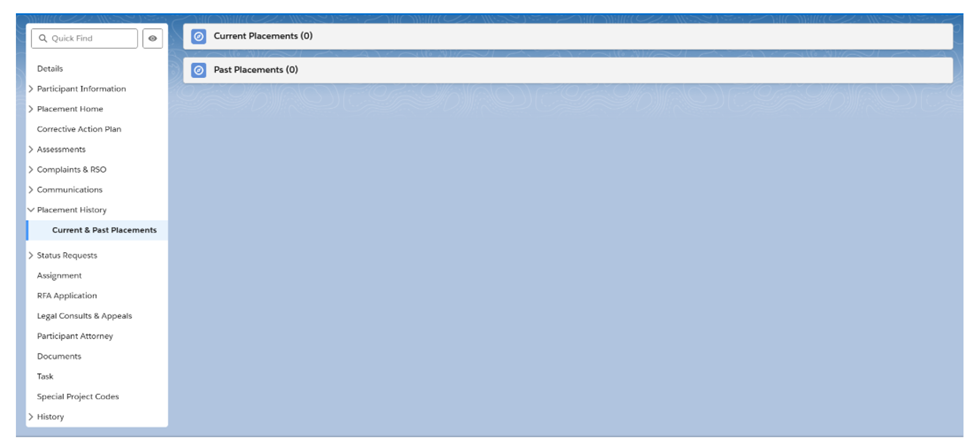
Q: I believe in one of the CWS-CARES meetings we were shown a demonstration that would allow us to look up the current facility roster that shows the children placed in a specific facility. Can you confirm whether that is accurate?
A: Yes, users can see a list view of currently placed children and list of historical placements.
Q: What Binti modules are approved for CWS-CARES data conversion?
A: The approved Binti modules for CWS-CARES data conversion are as listed below:
- Resource Family Approvals (RFA)
- Placement
- Family Finding
Q: Can the Project provide more information about Prospective Young Adult Re-Entry into Extended Foster Care (EFC), including what triggers the process and the points of re-entry?
A: CWS-CARES will have one consistent location for documenting re-entry into EFC activities, so that documentation can be better captured and monitored by the county. The user will be able to manage all of the tasks required when an eligible young adult wishes to re-enter EFC, and the system will prompt the user to complete the required tasks. Training materials are being developed to guide this process. There are various points of re-entry, including at screening and within case units of work. A recent demo is available on the CWDS website under Case Management, titled "Extended Foster Care - Initial Entry & Re-Entry into EFC".
Q: Does the information in CWS-CARES mirror the information in CalSAWS?
A: CWS-CARES will receive client-specific assistance payment details from CalSAWS. That information will be read-only in CWS-CARES.
Note: while CalSAWS sends Assistance Payment information to CWS-CARES, it won't be displayed the same way in CalSAWS and CWS-CARES. That is, if a user looks at an Issuance Detail in CalSAWS and then looks at an Assistance Payment record in CWS-CARES, they will see some of the same data elements, but that page layout and user interface won't be the same.