Product Features
Read about CWS-CARES functionality and new features. Expand your understanding of the new system, how it will work, and what the impact will be for end users.
The CWS-CARES Public Library is a searchable repository of project information. The articles published here may also be located in the CARES Explorer Newsletters. If you have any questions, please contact CWDS Communications.
Or browse articles by category:
Read about CWS-CARES functionality and new features. Expand your understanding of the new system, how it will work, and what the impact will be for end users.
Learn more about Service Areas (the core functions and capabilities of CWS-CARES related to child welfare activities and practices) and Milestones (significant stages in development).
Meet the people behind CWS-CARES and learn more about how different teams work together to shape the final product.
Dive deeper into the data and interfaces that will be needed for CWS-CARES.
Client → Person
Individuals who play a role in a Screening, Referral, or Case are captured as 'Persons' in CWS-CARES. Persons categorized as Core Participants can include the focus child, parent, CFT Member, and more.
Client Abstract/Notebook → Person Profile/Record
The ‘Person Record’ in CWS-CARES holds details about the Person depending on their role. The Person Record for a focus child includes comprehensive details and demographics including date of birth, address, education, health information, and more.
Hotline Workers will document information from the reporter into a Screening record in CWS-CARES. If an investigation is required, the Hotline Supervisor will promote this Screening to an Investigation and a new Referral record will be created. The assigned Emergency Response Worker will then document the details from the Investigation in the Referral record.
Hotline Workers will be able to indicate the reason for calls not related to abuse and neglect, including prevention services requests, community resources, social worker information requests, and prospective young adult re-entry requests. CWS-CARES will prompt the worker to collect only the information needed and generate reports on the different types of calls.
Workers conducting assessments can easily access SDM by clicking a link within CWS-CARES. After they've completed an assessment in SDM, that data will populate back into CWS-CARES to eliminate duplicate data entry.
Dashboards in CWS-CARES will organize Screenings, Referrals, assessments, and other work items to give workers and supervisors visibility to pending work. Supervisors can see a list of Screenings and Referrals that have been submitted for approval and how much work is assigned to each of their workers. Workers can see a list of Screenings and Referrals assigned to them and track unsubmitted items.
CWS-CARES will have address validation software that checks entered addresses against the United States Postal Service records to help prevent incorrect or incomplete addresses. Workers will have the option to override a suggested address.
A Mandated Reporter may now choose to receive the Emergency Response Notice of Disposition by email. CWS-CARES will automatically send this document to the email address provided to the Hotline Worker and evaluate at the disposition of a screening or an investigation.
Originally Published in the CWS-CARES Explorer.
Training for County forms authors consists of self-paced training and hands-on virtual training sessions. Self-paced training covers 12 lessons that focus on understanding and building PDF forms. Hands-on training covers Document Generation Solution components, eSignature, Forms Workspace access, template design considerations and development, testing, migration, and deployment. Hands-On Training for Cohorts 2 and 3 is scheduled for July 2025. Training for Cohort 4 will begin in August 2025.
In CWS/CMS, counties were limited to 200 forms. CWS-CARES does not have a limit on the number of forms that counties can build and make available to their county workers. County Forms Authors will be able to map data fields from CWS-CARES to forms so that data is automatically populated when the related document is generated by a worker. County Forms Authors will also be able to download any statewide form built in CWS-CARES, customize it for their county’s requirements, and save it for their workers to use.
All counties have been given an inventory of their county specific forms which are available in CWS/CMS.
A tracker, ‘CARES Forms Tracker’ is available in the CARES Forms Workgroup Team(s) channel containing the state forms for CARES V1 development.
A Forms Workgroup was created to support counties with forms management. Please contact them at otsicwdscaresforms@otsi.ca.gov with questions.
Originally Published in the CWS-CARES Explorer.
In CWS-CARES, the Court Record section will house all court work items, hearings, hearing outcomes, and active and closed cases. CWS-CARES will also facilitate the preparation and automation of documents and reports to ensure timely delivery. CARES Version 1 will include the following functionality in the Court Record:
Petitions under WIC 300, 342, and 387, which pertain to removal and custody of children through the Dependency Court, can be created in CWS-CARES. WIC 388 petitions, Request to Change Court Order, will also be available. Petition allegations and counts will now be available for selection and the appropriate JV forms (120 – 129) will then auto generate based on the allegations in the petition. Petition statuses will also be tracked and modified once ruled on by the court to create the final petition.
Hearing types, dates, and times will be documented in CWS-CARES, as well as the status of each hearing. As hearing dates are entered, noticing guidelines, timeframes, and details will be automatically generated in CWS-CARES, per WIC codes, for each hearing type.
Court Reports will look familiar; they are patterned after the INI templates used in CWS/CMS. Each county will be able to select the template that meets their court’s requirements and make alterations if needed. Unlike CWS/CMS, Court Reports can be created using Adobe (AEM) or Word, using prepopulated information from CWS-CARES. To create the Hearing Packet, users will have the ability to merge any documents, such as Case Plans, Service Provider Reports and/or other documents, with the Court Report. Electronic signatures will be available in CWS-CARES to make document signing more efficient for case workers.
Each County will be able to upload their own Warrant templates into CWS-CARES to comply with their practice and court preferences. Later updates of CWS-CARES may include an interface that supports sending and receiving Warrants in the system, along with many other court work items and documents.
Discovery requests can be easily processed and documented in CWS-CARES. The documents selected for the request can now be merged into a PDF and automatically stored in the system. The status of the Discovery Request can be tracked or assigned to another user. Once complete, the Discovery documents can be provided to parties via secure email, hard copy or flash drive, based on County policy.
Documenting important case information has never been easier; child welfare workers will now be able to immediately enter the court’s findings and orders in the Court Officer Notes section. These notes can be entered in the Hearing Results section of CWS-CARES and emailed to relevant parties (social worker, supervisor, eligibility). A signed copy of the Minute Order can also be uploaded into the system for easy reference once it is available.
Confidential Client Attorney Contacts is a new feature in CARES V1. It will allow consultations between staff and County Counsel to be documented in a secure contact that, due to their legally confidential nature, will not be subject to discovery requests or any type of records request. They will only be viewable by those assigned to the case, the supervisor, and the manager.
Originally Published in the CWS-CARES Explorer.
We're pleased to share some key takeaways and progress from our recent EUST 2 efforts involving the CalSAWS and CWS-CARES interface, called Foster Care Eligibility Determination (FCED).
It's encouraging to report that many testers successfully replicated the core functionality of the interface, establishing case links and exchanging data and documents effectively. A significant achievement was the observed real-time data exchange between the systems. This demonstrates the responsiveness and efficiency of the current integration. We truly value all feedback received, as it indicates that we are providing a functioning product for our users to interact with and evaluate. We acknowledge that some users experienced initial login difficulties during the first few days of testing. We have addressed these issues and are continuously working to ensure a seamless user experience.
Testers gave important feedback about how the CalSAWS test scripts and instructions needed to better match those for CWS-CARES EUST 2. To address this, we are committed to closer collaboration with CalSAWS during scenario preparation and will conduct thorough reviews of CalSAWS steps to ensure better synchronization.
In response to testers' requests for increased visibility into CalSAWS processes and steps, we are exploring opportunities for CWS-CARES testers to attend CalSAWS kickoffs and training sessions, and vice versa. We are also considering integrating relevant CalSAWS scenario materials into our CWS-CARES materials to provide a more comprehensive view.
Based on the feedback received in EUST 2, a new requirement was identified for the Eligibility Resource area. We learned that clearer error messaging is needed to notify users of any data fields that are incomplete before submitting to CalSAWS.
Eligibility testers said they need to better understand what happens in CalSAWS after data is sent from CWS-CARES. Additionally, testers expressed challenges in understanding the technical error messages received. To improve user experience, we're making it easier to see what's happening behind the scenes and understand error messages. We are actively implementing this enhancement prior to V1 Go-Live.
This collaborative testing effort with CalSAWS has provided valuable insights, and we are committed to acting on this feedback to further refine and strengthen the integration between our systems. We appreciate the valuable feedback from our EUST 2 testers and remain dedicated to continuous improvement.
On June 3, 2025 the project hosted an Introduction to FCED for Counties webinar. The session provided county staff with a foundational overview of FCED in CWS-CARES, covering the Who, What, When, Why, and How of the foster care eligibility determination process. The webinar also included a detailed demonstration of FCED functionality and live Q&A. For those who couldn’t attend, a recording of the session is available on the CWDS website.
Stay tuned for more learning opportunities as we continue to roll out FCED support. Thank you to everyone who attended the session!
Thanks to the valuable feedback we received from Extended User Feedback Testing (EUST) 2 participants, the CWS-CARES team is making updates to improve the system experience. Below is a summary of what we heard and how your input is driving changes.
From March 24 to April 18, 2025, the CWS-CARES project held its second round of EUST with 198 staff from 25 counties and CDSS participating. This critical effort provided the opportunity to test real-world scenarios and provide feedback on key system areas including Case Management, Resource Management, Eligibility, and Courts.
Compared to EUST 1, EUST 2 saw a significant increase in participation and feedback – 198 testers submitted 977 feedback items, up from 51 testers and 330 raw feedback items in EUST 1.
A feedback summary report was shared with all EUST 2 participants on May 14, 2025. The CWS-CARES team is now incorporating high-priority feedback. Looking ahead, the project is preparing for the next round of feedback:
EUST 3R – January 2026
Specific dates for the next testing period will be shared in the coming months. We thank all EUST 2 participants for their thoughtful contributions. Your feedback is shaping a better, more effective CWS-CARES for everyone.
CWS-CARES Feedback:
The chart below shows how feedback was distributed across the service areas. Case Management received the most input, followed by Courts, Eligibility, and Resource Management.
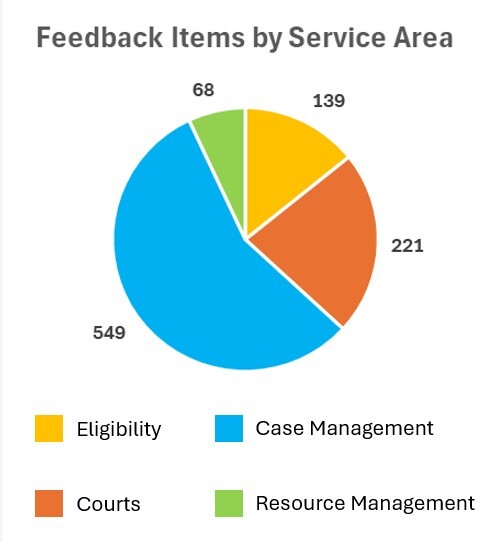
Testers shared positive impressions of the system’s improved design, ease of use, and overall user experience. Of the 977 feedback items received, 33 resulted in new functional requirements for development into CWS-CARES.
EUST 2 Process Feedback:
Support resources – such as training videos, the feedback site, check-in meetings, and office hours – were cited as helpful. Participants also identified opportunities for improvement:
Clearer, more detailed instructions
Better alignment and coordination with CalSAWS
More targeted training for new users
These suggestions are being used to improve materials and prepare for future testing efforts. Please contact the EUST team at careseust@otsi.ca.gov for more information about system and process feedback.
Originally Published in the CWS-CARES Explorer.
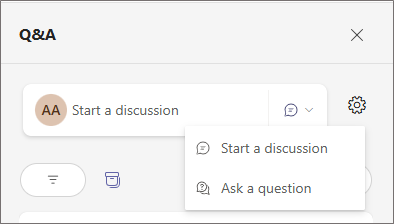
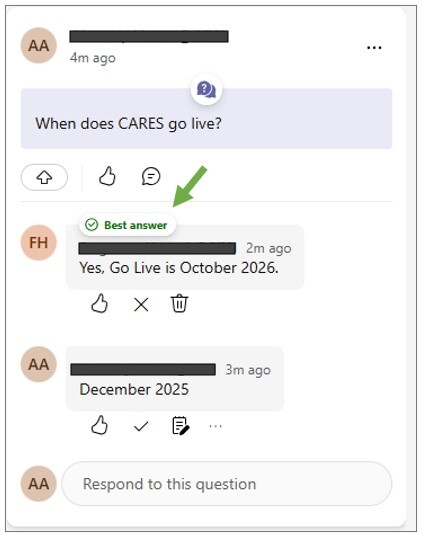
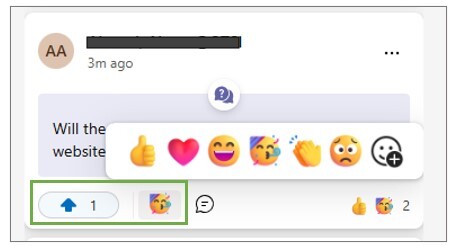
The Q&A feature in Microsoft Teams is used by the Project for large webinars like the Stakeholder Briefing. Attendees can easily ask questions, add emoji reactions, and upvote posts with Teams Q&A. Below is a brief introduction on how to use this tool.
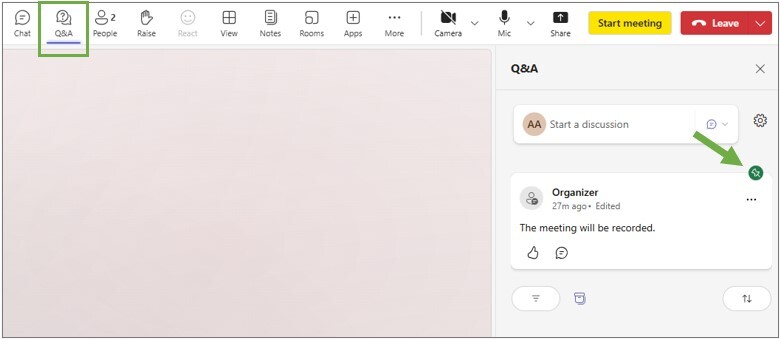
The teams Q&A button is located on the menu bar across the top of the screen, next to the Chat feature (note: the chat feature may be disabled in webinars where the Project uses Q&A). Clicking on the Q&A button will open a side panel on the right side of the screen. Here, attendees can ask questions, start discussions, and view the archive of posts from the webinar.
At the top of the thread, attendees will see posts pinned by the organizers of the meeting. They may contain announcements or resources applicable to all attendees. Pinned posts will show a green pin on the top right corner and will remain at the top of the thread throughout the meeting.