
CWS-CARES Public Library
The CWS-CARES Public Library is a searchable repository of project information. The articles published here may also be located in the CARES Explorer Newsletters. If you have any questions, please contact CWDS Communications.
Teams and Roles
It’s Not Too Late for OCM: Guidance for Preparing for Go-Live
- Strengthen Staff Awareness and Reinforce the Why: Reinforce why we are transitioning to CWS-CARES, shareknown updates, and acknowledge that some details arestill evolving. Maintain steady communication andencourage flexibility.
- Maintain Momentum with Staff and Super Users: Encourage organization leaders and Project Teammembers (SPOCs, Implementation Coordinators, and OCMCoordinators) to support ongoing huddles and touchpointsto share updates, address questions, and keep teamsconnected.
- Track and Complete Training: Confirm training is completeor progressing as expected and identify staff needingadditional practice or support.
- Promote Practice and Familiarization: Encourage staff topractice in the Prod Sim environment,revisit CWS-CARESresources, training materials, demonstrations, and quickreference guides to build skills and reduce day-one anxiety.
- Update Local Implementation Plans: Aligncommunication, resource distribution, practicetime, and staff outreach with the new Go-Livedate.
- Update Business Processes: Identify anyadditional organization specific changes andrefine local business processesand procedures.
- Review Available Project Resources: Revisit the ImplementationPortal and CWDSWebsite for updates,tools, and resourcesto support thetransition to CWS-CARES.
Originally published in the CWS-CARES Explorer.
Preparing for Change: Processes, Readiness & Resources
How BPR Archetype & Delta Sessions Support the Path to CWS-CARES
In July and August, Organizations participated in Archetype and Delta Sessions to better understand how CWS-CARES affects their current business processes.
Archetype Sessions, held in July, brought together representative Organizations from county child welfare, probation offices, and Title IV-E Tribes to review high-impact process changes. Feedback from these sessions were used to develop “archetypes”, which illustrate how impacts vary based on Organization size, business process complexity, and other factors.
Delta Sessions, held from July 28 through August 28, build on this work through optional one-on-one sessions comparing an Organization’s current processes with the statewide view developed during the Archetype Sessions.
These sessions help Organizations identify where additional preparation may be needed, including updates to procedures, coordination with partners, or staff training.
Participating Organizations receive follow-up materials, including change impact worksheets to support planning. Organizations that were unable to attend a Delta Session can access change impact worksheets through the CWDS Implementation Portal and Organizational Change Management Portal.
What’s Next: Major Activities for Organizational Change Management
Key upcoming activities include:
- OCM Advisory Workgroup: Monthly sessions through October to gather cross-organizational input on OCM materials, change impacts, and communication needs.
- CWS-CARES Super User Readiness Meetings: Biweekly sessions through September to prepare Super Users for Go-Live support, including workflows, system guidance, troubleshooting, and implementation readiness.
- Process Reviews: Ongoing discussions with Service Managers and subject matter experts (SMEs) to validate and update change impacts and process maps before Go-Live.
- Tool Development: Finalizing readiness resources, including OCM Guidance, Worker Permission Profiles, and a Leadership Toolkit to support planning, change impacts, communications, and change management.
The CWS-CARES Implementation Portal is a central hub for Implementation Readiness, OCM, and Training resources. Key OCM resources are available on the CWS-CARES Organizational Change Management Team pages.
Originally published in the CWS-CARES Explorer.
CWS-CARES Training in Full Motion Across California
1. Train-the-Trainer: Completed and Building Local Knowledge
Train-the-Trainer (TTT) has successfully concluded, marking a key milestone in statewide readiness. A total of 661 trainees across 6 cohorts within 34 classes completed the program.
These trainers are now prepared to support local teams during Instructor Led Training. TTT materials, including facilitator guides and training decks are available on the CWS-CARES Implementation Portal page here for ongoing use.
2. On-Demand Learning: Enablement Modules Actively in Progress
Since July, learners have been provided access to the Production Simulation Environment (CARES 100) to complete On-Demand Learning Enablement modules. These modules introduce key concepts, system fundamentals, and workflow basics that prepare participants for the more hands-on components of training.
Organizations are encouraged to complete the modules ahead of their scheduled Instructor Led Training sessions. Depending on their role and learning path, users may be assigned up to 40 hours of On-Demand Learning content. (Note: Users do not need to complete every assigned course and will continue to have access to the modules after Go-Live.)
Users can track progress through the My Assigned Learning Dashboard in CARES 100, which displays completion status by assigned learning, program, and lesson. For more instructions, refer to the Quick Guide – Dashboard Retrieval Guide. We recommend that Organizations continue supporting module completion and for staff to actively use the dashboard to monitor their progress. Early preparation now contributes to more effective training and a smoother transition into CWS-CARES.
3. Instructor Led Training: Rolling Out Across the State
Instructor Led Training began in early August and will continue through October 23. These training courses provide guided practice, and opportunities to ask questions, and hands-on experience with CWS-CARES workflows.
Training schedules vary by Organization, but users can typically expect:
- Courses offered virtually or in person based on Organization needs.
- Courses assigned based on each user’s role as advised by their Supervisor, Training Coordinator, and learning path.
- Sessions lasting approximately half a day, with courses offered twice daily.
- Use of the Training Environment (CARES 104) during classroom training.
Originally published in the CWS-CARES Explorer.
Understanding Organizational Change Management (OCM) and Business Process Re-engineering (BPR)
BPR Team: Understanding How Work Will Change
The Business Process Re-engineering (BPR) team identifies where new technology changes an organization’s day-to-day operational practices. Working directly with county and state users, the team compares how work is done today with how it will be done in CWS-CARES Version 1 (CARES V1) and helps organizations see where its local practices or policies may need to adjust. This work happens through a series of working sessions with organizations:
- Operational Alignment Session (scheduled for 7/7/26): Orients organizations to the BPR process and the tools it supports.
- Archetype Sessions (scheduled for early to mid July): Identifies the statewide process that are shared and those that vary.
- Delta Sessions (scheduled for late July to August): Helps each organization pinpoint where local practices or policies need to align with CARES V1 workflow.
The Organizational Change Management (OCM) team focuses on the people side of the transition, preparing staff to adopt the changes BPR identifies. OCM is delivering two key resources:
- OCM Plan: A clear strategy/roadmap that guides leadership and builds change management capacity.
- OCM Guidance Material: Toolkit of resources, templates, and processes that help local coordinators carry out the strategy.
In essence, Business Process Re-engineering builds the path to CARES V1, and Organizational Change Management prepares the people who will walk it.
Originally published in the CWS-CARES Explorer.
Process Information Sessions: What's Been Covered and What's Ahead
Additional Process Information Sessions will be held early in 2026, and the follow-up sessions will continue to be scheduled into the new year.
Visit the Implementation Portal to learn more about the sessions or download the recordings and materials from these sessions: CWS-CARES Process Information Sessions.

Originally published in the CWS-CARES Explorer.
Learn More about CWS-CARES: Resources Introduced in 2025
CWS-CARES Infographics, Flyers, and Slogans Webpage
Product Demonstrations Webpage
CWS-CARES Weekly Digest
Progress and Engagement Summary
CWS-CARES Public Library
Portals and Hubs
Project Newsletters
CWS-CARES Video Series
Watch a 7-minute demonstration of the CWDS website to view more resources available to our stakeholders.The resources demonstration was created for the CWS-CARES Stakeholder Briefing #5 on January 25, 2026 and can be found in the corresponding folder on the Stakeholder Webinar Materials page: Stakeholder Webinar Materials | CWDS.
Originally published in the CWS-CARES Explorer.
Strengthening Coordination: New External Systems Resources
CWDS Website Update: The External Systems Portal
To make it easier to stay informed, the new External Systems Portal serves as your one-stop shop for all external systems information. The portal includes monthly meeting recordings and materials, along with other helpful resources to keep organizations connected and prepared. To access these materials, please log in using your county email address.
External Systems Monthly Meetings
The CWS-CARES Project launched a new External Systems Monthly Meeting Series to create a consistent space for organizations to connect with the Project team, share updates, ask questions, and stay aligned on upcoming activities. Meetings are held on the second Thursday of each month from 10–11 AM.
Topics covered so far:
- July 10: Kickoff and External Systems Overview
- August 14: Resource Family Approval (RFA) Overview
- September 11: Data Conversion and County Engagement Milestones
Upcoming session topics:
- October 16 [updated]: Continued Operations – Validating and Preparing External Systems for CWS-CARES V1 Go-Live
- November 13: Exploring Validation Tools and Activities
If you would like to receive a meeting invite, please contact the External Systems Coordination Unit (ESCU) Team.
Originally published in the CWS-CARES Explorer.
What is the CWS-CARES Super User Program?
Key Roles and Responsibilities of Super Users
Super Users are organization staff members that support end users with expertise, coaching, and first-level support during critical project phases and at Go-Live. Super Users will be instrumental during the Go-Live phase by partnering with the project's implementation team to provide over-the-shoulder support to CWS-CARES users within their organization.How many Super Users are there?
As of May 2025, there are just over 800 Super Users that have been identified across 53 Child Welfare counties, tribes, and CDSS. The project's implementation team will continue to collect names of Super Users.Orientation Sessions for CWS-CARES Super Users
Orientation will provide participants with an in-depth overview of the Super Users Program. This will include the functions of a Super User and strategies for success when implementing CWS-CARES in their Organization. Orientation sessions will also provide more information on the opportunities that Super Users can participate in and what support is offered.
Originally Published in the CWS-CARES Explorer.Process Information Sessions: What's Changing for Intake?
New Terminology in CWS-CARES
Here are a few new terms CWS-CARES users will see across different areas of the new system:
Client → Person
Individuals who play a role in a Screening, Referral, or Case are captured as 'Persons' in CWS-CARES. Persons categorized as Core Participants can include the focus child, parent, CFT Member, and more.
Client Abstract/Notebook → Person Profile/Record
The ‘Person Record’ in CWS-CARES holds details about the Person depending on their role. The Person Record for a focus child includes comprehensive details and demographics including date of birth, address, education, health information, and more.
New Features and Updates in CWS-CARES
Two-Step Referral Process
Hotline Workers will document information from the reporter into a Screening record in CWS-CARES. If an investigation is required, the Hotline Supervisor will promote this Screening to an Investigation and a new Referral record will be created. The assigned Emergency Response Worker will then document the details from the Investigation in the Referral record.
Streamlined Non-Abuse and Neglect Calls
Hotline Workers will be able to indicate the reason for calls not related to abuse and neglect, including prevention services requests, community resources, social worker information requests, and prospective young adult re-entry requests. CWS-CARES will prompt the worker to collect only the information needed and generate reports on the different types of calls.
Data Integration
Workers conducting assessments can easily access SDM by clicking a link within CWS-CARES. After they've completed an assessment in SDM, that data will populate back into CWS-CARES to eliminate duplicate data entry.
Dashboards
Dashboards in CWS-CARES will organize Screenings, Referrals, assessments, and other work items to give workers and supervisors visibility to pending work. Supervisors can see a list of Screenings and Referrals that have been submitted for approval and how much work is assigned to each of their workers. Workers can see a list of Screenings and Referrals assigned to them and track unsubmitted items.
Address Validation
CWS-CARES will have address validation software that checks entered addresses against the United States Postal Service records to help prevent incorrect or incomplete addresses. Workers will have the option to override a suggested address.
Autogenerated Email Responses
A Mandated Reporter may now choose to receive the Emergency Response Notice of Disposition by email. CWS-CARES will automatically send this document to the email address provided to the Hotline Worker and evaluate at the disposition of a screening or an investigation.
Originally Published in the CWS-CARES Explorer.
How to Use the Microsoft Teams Q&A Feature
The Q&A feature in Microsoft Teams is used by the Project for large webinars like the Stakeholder Briefing. Attendees can easily ask questions, add emoji reactions, and upvote posts with Teams Q&A. Below is a brief introduction on how to use this tool.
Accessing Teams Q&A
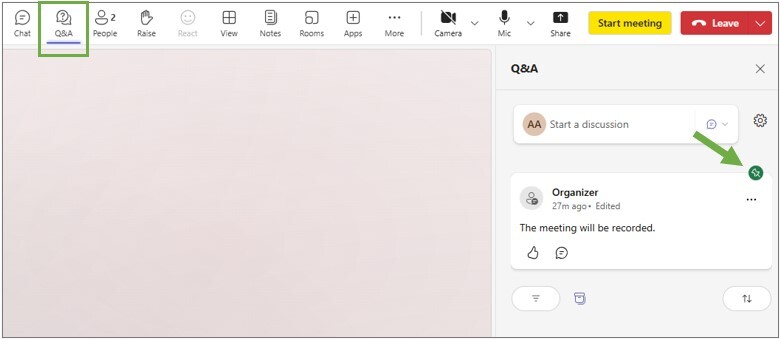
The teams Q&A button is located on the menu bar across the top of the screen, next to the Chat feature (note: the chat feature may be disabled in webinars where the Project uses Q&A). Clicking on the Q&A button will open a side panel on the right side of the screen. Here, attendees can ask questions, start discussions, and view the archive of posts from the webinar.
Pinned Posts
At the top of the thread, attendees will see posts pinned by the organizers of the meeting. They may contain announcements or resources applicable to all attendees. Pinned posts will show a green pin on the top right corner and will remain at the top of the thread throughout the meeting.
Asking Questions and Starting Discussions
To ask a question, select “Ask a Question” from the dropdown, then click “Publish”. Attendees can also “Start a Discussion” to add comments that do not require a response (i.e. requests for troubleshooting).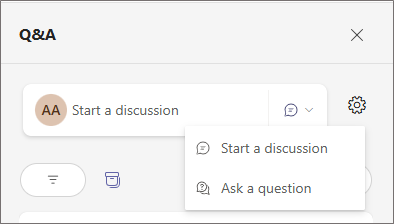
Best Answer Feature
Questions that have been answered or vetted by CWS-CARES Subject Matter Experts (SMEs) will be marked with the “Best Answer” check mark.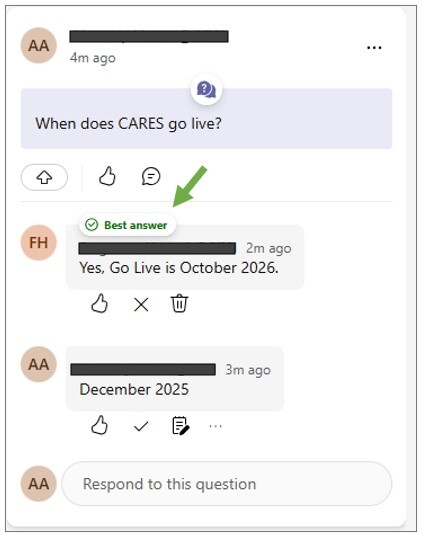
Reactions and Participation
Attendees can react to posts with emojis or with upvotes by clicking the blue arrow icon in the bottom left corner.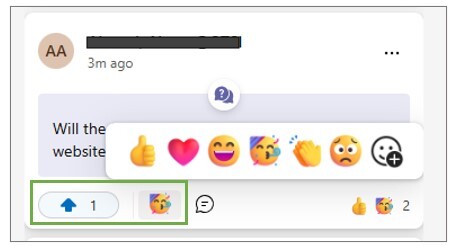
Moderation Settings
Depending on the webinar, the Project may turn on additional moderation features which limit the amount of questions in the main thread. If these settings are enabled, there may be a delay in seeing your question appear while a SME generates a response.For additional support with Microsoft Teams or to request accommodations for a virtual meeting, please contact Customer Relations at CWS_CustRel@osi.ca.gov.