
December 2024 Workstation Patches
All Co-Existent County SPOCs and Technical Contacts:
As requested, here is the list of patches that IBM tested and applied to the Dedicated County Workstations for November 2024:
MS Windows 10 22H2 Patches
MS24-DEC: Cumulative Update for Windows 10 Version 22H2 - Windows 10 Version 22H2 - KB5048652 (x64) Critical
MS Windows 2016 (LTSB) Patches
MS24-DEC: Cumulative Update for Windows 10 Version 1607 - Windows 10 Version 1607 LTSB - KB5048671 (x64) Critical
MS Office 2016 Patches
MS24-DEC: Security Update for Microsoft Access 2016 - Access 2016 - KB5002641 Important
MS24-DEC: Security Update for Microsoft Excel 2016 - Excel 2016 - KB5002660 Important
MS24-DEC: Security Update for Microsoft Office 2016 - Office 2016 - KB4475587 Important
MS24-DEC: Security Update for Microsoft Office 2016 - Office 2016 - KB5002661 Important
Google Chrome Patches
Google Chrome 131.0.6778.140 High Unspecified
Adobe
Adobe Acrobat Reader 2024.005.20320 Available
Adobe Acrobat Reader 2024.005.20320 Available - Adobe Acrobat Reader - Continuous Track Critical APSB24-92
Action Required
No action is required. Informational only.
CWDS Bulletins
CWS/CMS: IBM Help Desk Phone System – UPDATE
All SPOCs and Technical Contacts:
December 24, 2024 UPDATE:
The issue with the IBM Help Desk Phone System is still being investigated, and it is expected to take a few days to resolve. As a temporary solution, please use the alternate phone number provided below to reach the IBM Help Desk. Alternate Phone Number: 1-855-479-3365
Please note: this alternate phone number will remain in effect until the issue with the original IBM Help Desk Phone System is resolved.
We appreciate your patience.
_________________________________________________________________
An issue has been discovered with the IBM Help Desk Phone System. Callers receive a message that the call cannot be completed as dialed or the call is dropped. This issue is being investigated and additional updates will be sent out as status is received.
Action Required
If users experience any issues with CWS/CMS, please follow your county process for reporting issues or you may contact the IBM Boulder Help Desk at the alternate phone number listed above.
December 24, 2024 UPDATE:
The issue with the IBM Help Desk Phone System is still being investigated, and it is expected to take a few days to resolve. As a temporary solution, please use the alternate phone number provided below to reach the IBM Help Desk. Alternate Phone Number: 1-855-479-3365
Please note: this alternate phone number will remain in effect until the issue with the original IBM Help Desk Phone System is resolved.
We appreciate your patience.
_________________________________________________________________
An issue has been discovered with the IBM Help Desk Phone System. Callers receive a message that the call cannot be completed as dialed or the call is dropped. This issue is being investigated and additional updates will be sent out as status is received.
Action Required
If users experience any issues with CWS/CMS, please follow your county process for reporting issues or you may contact the IBM Boulder Help Desk at the alternate phone number listed above.
Some CWDS Website Areas Moving Behind County Logon Page - Effective Dec. 23, 2024
All SPOCs:
Effective Monday, December 23, 2024, the CWDS Office has decided to relocate the following areas/pages from the public-facing CWDS website and move them to the County Logon area (https://cwds.ca.gov/):
Users attempting to access these pages will be prompted to enter their login credentials for the CWDS website if they are not already logged in. This change will take effect on Monday, December 23, 2024.
Action Required
No action is required. Users can sign up with a valid organizational email domain to access the pages listed above, as well as any other sections of the CWDS website that require recognized login credentials.
Please contact the CWDS Customer Relations mailbox if you have any questions regarding this action.
Effective Monday, December 23, 2024, the CWDS Office has decided to relocate the following areas/pages from the public-facing CWDS website and move them to the County Logon area (https://cwds.ca.gov/):
- County Info | State Recognized County Administrator List
- County Info | Regional Chair page
- County Info | 24 x 7 Site List
- Data Quality Portal | Data Quality Workgroup Leads list
- Data Quality Portal | CWS/CMS Data Quality Dashboard
- Probation Users | “Who to Contact” document
- Probation Users | SPOC Guide
- County Contacts Page (moved to County Logon area on December 16, 2024)
Users attempting to access these pages will be prompted to enter their login credentials for the CWDS website if they are not already logged in. This change will take effect on Monday, December 23, 2024.
Action Required
No action is required. Users can sign up with a valid organizational email domain to access the pages listed above, as well as any other sections of the CWDS website that require recognized login credentials.
Please contact the CWDS Customer Relations mailbox if you have any questions regarding this action.
The CARES Explorer Newsletter – December 2024 Issue
To: CARES SPOCs and Implementation Coordinators
CC: County, Tribe, Probation, and State Leadership, OCM Coordinators
We are pleased to share the CARES Explorer - December 2024 issue, the newsletter for staying up to date on the CWS-CARES project.
This is sent directly to our key stakeholders for project communications: County, Tribe, Probation, and State leadership, CARES Single Point of Contacts (SPOCs), and Organization Implementation Coordinators.
This issue contains information on:
Stakeholders: Discover how the Office of Technology and Solutions Integration (OTSI) is working on the project and understand OTSI’s role as the CWS-CARES project sponsor. Read about how the project partners with organizations to ensure information is shared effectively and the three key communication roles that foster statewide adoption and utilization of CWS-CARES. We also highlight Humboldt County’s creative ways to build awareness and enthusiasm for CWS-CARES.
CWS-CARES: This issue highlights the Reports area, the future of SafeMeasures® and Structured Decision Making® (SDM) assessments with the implementation of CWS-CARES, Resource Family Approval (RFA), holistic design updates, and the CARES Prototype demonstrations and feedback.
Hidden Gems: Learn more about the power of plain language, the results from our Organizational Change Management (OCM Survey), EUST2, and the Stakeholder Briefing series.
We recommend that you share this newsletter at your discretion with staff that are impacted by the changes coming with CWS-CARES.
The CARES Explorer – December 2024 issue is now available here: 20241218_CARES_Explorer_Issue 4
You may also obtain all CARES Explorer issues on the CWDS website: CARES Compass/Explorer | Child Welfare Digital Services
If you have any questions, need clarification, or have any accessibility issues, please do not hesitate to contact Customer Relations.
Action Required:
We request that all CARES Single Point of Contacts (SPOCs) and Implementation Coordinators coordinate and distribute the CARES Explorer Newsletter to all staff impacted by CWS-CARES at their discretion.
CC: County, Tribe, Probation, and State Leadership, OCM Coordinators
We are pleased to share the CARES Explorer - December 2024 issue, the newsletter for staying up to date on the CWS-CARES project.
This is sent directly to our key stakeholders for project communications: County, Tribe, Probation, and State leadership, CARES Single Point of Contacts (SPOCs), and Organization Implementation Coordinators.
This issue contains information on:
Stakeholders: Discover how the Office of Technology and Solutions Integration (OTSI) is working on the project and understand OTSI’s role as the CWS-CARES project sponsor. Read about how the project partners with organizations to ensure information is shared effectively and the three key communication roles that foster statewide adoption and utilization of CWS-CARES. We also highlight Humboldt County’s creative ways to build awareness and enthusiasm for CWS-CARES.
CWS-CARES: This issue highlights the Reports area, the future of SafeMeasures® and Structured Decision Making® (SDM) assessments with the implementation of CWS-CARES, Resource Family Approval (RFA), holistic design updates, and the CARES Prototype demonstrations and feedback.
Hidden Gems: Learn more about the power of plain language, the results from our Organizational Change Management (OCM Survey), EUST2, and the Stakeholder Briefing series.
We recommend that you share this newsletter at your discretion with staff that are impacted by the changes coming with CWS-CARES.
The CARES Explorer – December 2024 issue is now available here: 20241218_CARES_Explorer_Issue 4
You may also obtain all CARES Explorer issues on the CWDS website: CARES Compass/Explorer | Child Welfare Digital Services
If you have any questions, need clarification, or have any accessibility issues, please do not hesitate to contact Customer Relations.
Action Required:
We request that all CARES Single Point of Contacts (SPOCs) and Implementation Coordinators coordinate and distribute the CARES Explorer Newsletter to all staff impacted by CWS-CARES at their discretion.
CWS/CMS: CDT Service Desk Bulletin – SBCS Infrastructure Servers Security Patching
All SPOCs, Technical Contacts, and SBC Administrators:
The California Department of Technology (CDT) has scheduled maintenance on Saturday, December 28, 2024, beginning at 6:00 AM and concluding at 10:00 AM. During the maintenance window, CDT will apply Standard Monthly OS Security Patches to SBCS Infrastructure Servers. There is no anticipated outage for this maintenance; however, CDT is asking that everyone log off from the Citrix SBC system, if not actively using it during the maintenance window.
Action Required
If users experience any issues with CWS/CMS, please follow your county process for reporting issues or you may contact the IBM Boulder Help Desk at 1-800-428-8268.
The California Department of Technology (CDT) has scheduled maintenance on Saturday, December 28, 2024, beginning at 6:00 AM and concluding at 10:00 AM. During the maintenance window, CDT will apply Standard Monthly OS Security Patches to SBCS Infrastructure Servers. There is no anticipated outage for this maintenance; however, CDT is asking that everyone log off from the Citrix SBC system, if not actively using it during the maintenance window.
Action Required
If users experience any issues with CWS/CMS, please follow your county process for reporting issues or you may contact the IBM Boulder Help Desk at 1-800-428-8268.
CWS-CARES Scheduled Maintenance
All Pilot County RFA Implementation Coordinators and SPOCs:
The CWS-CARES team has scheduled maintenance activity for the CWS-CARES production environment for Monday, December 23, 2024, beginning at 6:00 AM and concluding at 8:00 AM. During the maintenance window, the CWS-CARES Resource Family Approval (RFA) Application Submission, Review, and Approval Process will be accessible for pilot counties Contra Costa, Fresno, Placer, and Santa Clara.
During the maintenance window, document related functionality in the CARES application will not be accessible.
Action Required
No action required from end-users during this maintenance window.
If users experience any issues with the CWS-CARES, please follow your county process for reporting issues. CWS-CARES County Administrators may contact the CARES Service Desk through the CWDS ServiceNow Customer Support Management (CSM) Portal. Alternate methods are phoning 1-855-292-3444 or via email at Servicedesk@cwds.ca.gov during normal business hours. You may also email after hours, and a Service Desk representative will contact you the next business day.
The CWS-CARES team has scheduled maintenance activity for the CWS-CARES production environment for Monday, December 23, 2024, beginning at 6:00 AM and concluding at 8:00 AM. During the maintenance window, the CWS-CARES Resource Family Approval (RFA) Application Submission, Review, and Approval Process will be accessible for pilot counties Contra Costa, Fresno, Placer, and Santa Clara.
During the maintenance window, document related functionality in the CARES application will not be accessible.
Action Required
No action required from end-users during this maintenance window.
If users experience any issues with the CWS-CARES, please follow your county process for reporting issues. CWS-CARES County Administrators may contact the CARES Service Desk through the CWDS ServiceNow Customer Support Management (CSM) Portal. Alternate methods are phoning 1-855-292-3444 or via email at Servicedesk@cwds.ca.gov during normal business hours. You may also email after hours, and a Service Desk representative will contact you the next business day.
CWS-CARES Scheduled Maintenance - December 23, 2024 | 6 AM - 8 AM
All Pilot County RFA Implementation Coordinators and SPOCs:
The CWS-CARES team has scheduled maintenance activity for the CWS-CARES production environment for Monday, December 23, 2024, beginning at 6:00 AM and concluding at 8:00 AM. During the maintenance window, the CWS-CARES Resource Family Approval (RFA) Application Submission, Review, and Approval Process will be accessible for pilot counties Contra Costa, Fresno, Placer, and Santa Clara.
During the maintenance window, document related functionality in the CARES application will not be accessible.
Action Required
No action required from end-users during this maintenance window.
If users experience any issues with the CWS-CARES, please follow your county process for reporting issues. CWS-CARES County Administrators may contact the CARES Service Desk through the CWDS ServiceNow Customer Support Management (CSM) Portal. Alternate methods are phoning 1-855-292-3444 or via email at Servicedesk@cwds.ca.gov during normal business hours. You may also email after hours, and a Service Desk representative will contact you the next business day.
The CWS-CARES team has scheduled maintenance activity for the CWS-CARES production environment for Monday, December 23, 2024, beginning at 6:00 AM and concluding at 8:00 AM. During the maintenance window, the CWS-CARES Resource Family Approval (RFA) Application Submission, Review, and Approval Process will be accessible for pilot counties Contra Costa, Fresno, Placer, and Santa Clara.
During the maintenance window, document related functionality in the CARES application will not be accessible.
Action Required
No action required from end-users during this maintenance window.
If users experience any issues with the CWS-CARES, please follow your county process for reporting issues. CWS-CARES County Administrators may contact the CARES Service Desk through the CWDS ServiceNow Customer Support Management (CSM) Portal. Alternate methods are phoning 1-855-292-3444 or via email at Servicedesk@cwds.ca.gov during normal business hours. You may also email after hours, and a Service Desk representative will contact you the next business day.
CWDS County Contacts Page Moved Behind County Login Page
All SPOCs:
The CWDS Office has decided to remove the CWDS Contacts pages from the public-facing website, available to all users. Instead, to view this contact information, a user must first log in with a valid email address recognized by an organizational email domain. A user trying to access this ‘Contacts’ section will be required to enter log-in credentials for the CWDS website if they have not already logged in. This change was implemented today, December 16, 2024.
Action Required
No action required. Users may self-register to ‘Behind County Login’ by signing up with a valid organizational email domain to access the County Contacts, and all other sections of the CWDS website requiring recognized login credentials.
The CWDS Office has decided to remove the CWDS Contacts pages from the public-facing website, available to all users. Instead, to view this contact information, a user must first log in with a valid email address recognized by an organizational email domain. A user trying to access this ‘Contacts’ section will be required to enter log-in credentials for the CWDS website if they have not already logged in. This change was implemented today, December 16, 2024.
Action Required
No action required. Users may self-register to ‘Behind County Login’ by signing up with a valid organizational email domain to access the County Contacts, and all other sections of the CWDS website requiring recognized login credentials.
CWS/CMS Release 9.5 and Interim Release 9.5.0 (3-Day Reminder) Bulletin
Release 9.5 will be implemented on Saturday, December 14, 2024
The application outage begins on Saturday, December 14, 2024, at 5:00 AM and will most likely complete around 11:00 AM. Users will not be able to access the CWS/CMS application during this period. All application updates will be applied during this outage and should be available once the outage is complete.
Note: Business Objects will be unavailable from approximately 8 AM to 11 AM while the Release 9.5 updates are being applied.
Customer support will be available from the IBM Helpdesk at (800) 428-8268.
Coexistent county CWSCMS.MSI file availability:
The CWSCMS.MSI file was made available on Friday, December 6, 2024, for technical staff to begin testing the installation of the release. The code is located on the CWSDFSr share in the following location:
By Friday, December 6, 2024, dedicated county users should have started seeing the CWSCMS.MSI file copied to their workstations during Windows logon. Technical staff can verify that they have received the file by checking for its presence in the C:\CACW\R95 folder. This file must exist on the workstation for the installation of Release 9.5 to take place on or after December 14, 2024.
Dedicated County users should do the following on the night before the release:
The application outage begins on Saturday, December 14, 2024, at 5:00 AM and will most likely complete around 11:00 AM. Users will not be able to access the CWS/CMS application during this period. All application updates will be applied during this outage and should be available once the outage is complete.
Note: Business Objects will be unavailable from approximately 8 AM to 11 AM while the Release 9.5 updates are being applied.
Customer support will be available from the IBM Helpdesk at (800) 428-8268.
Coexistent county CWSCMS.MSI file availability:
The CWSCMS.MSI file was made available on Friday, December 6, 2024, for technical staff to begin testing the installation of the release. The code is located on the CWSDFSr share in the following location:
- \CODEDIST\Staging\R95
By Friday, December 6, 2024, dedicated county users should have started seeing the CWSCMS.MSI file copied to their workstations during Windows logon. Technical staff can verify that they have received the file by checking for its presence in the C:\CACW\R95 folder. This file must exist on the workstation for the installation of Release 9.5 to take place on or after December 14, 2024.
Dedicated County users should do the following on the night before the release:
- Restart (reboot) the workstation and log into Windows (aka the "welcome screen").
- Restart again and do not log into Windows.
- Leave the workstation powered on.
Business Objects Issue and Workaround – UPDATE 2
All SPOCs, Technical Contacts, and CAD Contacts:
December 11, 2024 UPDATE 2: The BO production environment was experiencing congestion and running slowly this morning. As a result, the BO team performed a reboot at 11:30 AM. The reboot was successful, and everything is now functioning properly.
_________________________________________________________________
December 11, 2024 UPDATE: The CWDS custom branding effort failed last night and the Business Objects (BO) login screen was reverted to the generic SAP version. The BO team will research this branding issue and then determine the next steps in regards to this effort.
Meanwhile, the BO production environment is down this morning. The BO team is researching the cause, including if it is related to last night’s rollback following the failed custom branding effort.
The BO reports did not run last night. Once the BO environment has recovered, users will need to review the reports, and run them if needed.
Additional communications will be delivered as new updates are provided.
_________________________________________________________________
December 6, 2024 UPDATE: The CWDS Office and IBM have scheduled an outage for the Business Objects (BO) server to update the branding on the Business Intelligence login screen. Following the update, the branding will return to the normal CWDS branding instead of the generic SAP screens. The scheduled BO maintenance outage will be on Tuesday, December 10, 2024, beginning at 4:00 PM and concluding at 4:30 PM.
BO will not be available during the scheduled outage.
The CWDS Office and IBM continue to work with the vendor on the issue regarding transferring reports to and from the Rich Client server. An additional update will be provided once the fix for that issue has been determined.
_________________________________________________________________________________
November 21, 2024 UPDATE: After working with the Business Objects vendor, IBM and the CWDS Infrastructure team are reporting that Business Objects is now up and operational, with a few limited issues / differences that remain to be resolved.
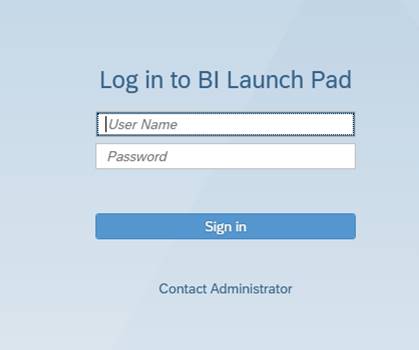
Please Note: The login screens will look a bit different. Generic SAP screens will be used temporarily and will be updated at a later date (please see screenshot below).
In addition, there appears to be an issue with transferring reports from Rich Client to the server and back. IBM and the Infrastructure team will work with the vendor as a fix for this specific continuing issue becomes available.
Screenshot of the generic login screen:
__________________________________________________________________________________________
November 20, 2024 UPDATE: Several issues have been identified after the installation of the Business Objects patch upgrade. Work is taking place now to resolve those issues and a communication will be shared once resolved.
_______________________________________________________________________
November 20, 2024 FINAL UPDATE: The installation of the Business Objects patch upgrade has completed. Business Objects is now accessible; however, users may experience degraded performance while the Business Objects server catches up on the scheduled jobs from this morning. The CWDS Infrastructure team and IBM are monitoring for potential issues.
NOTE: Web Intelligence Rich Client users may need to update their workstation installation of the client.
_______________________________________________________________________
November 20, 2024 UPDATE: This is a reminder that the Business Objects production environment is not available this morning, to install a patch update. A follow-up communication will be sent out once the environment has become available, estimated to occur at around 12:00 Noon.
________________________________________________________________________
UPDATE: We are applying a patch to address this Business Objects issue, which will be implemented in both the Training and Production Environments. These environments will be unavailable during the following patch periods:
Action Required
If users experience any issues please follow your county process for reporting issues or you may contact the IBM Boulder Help Desk at 1-800-428-8268.
_____________________________________________________________________________
An issue has been discovered with the current version of Business Objects used with the CWS/CMS application.
Issue Description:
Whenever a numeric field, such as government entity code, is used as a condition in a data provider (query), the query will run correctly the first time. Whenever the data provider is edited, the system will return a type mismatch error and require the user to remove and re-add the condition. The query will then run, as long as it is not edited again.
This only appears to be an issue with numeric fields; character fields, such as Client Name, do not experience this issue. Once the query is run, it operates normally as long as the user does not go back and edit the data provider. The user can refresh the data and save, as well as edit the report formatting, without issue.
Issue Resolution:
A patch level update will be required to resolve the issue. The CWDS Office and IBM are evaluating the next Business Objects patch to determine if it will resolve the issue, without generating any new issues. There is currently no estimated time of when the patch will be implemented. Additional updates will be sent out as new information is received.
Workaround:
When Business Objects informs the user of a type mismatch error after a numeric field is used as a condition in a data provider, and the data provider is edited, then the user must remove and re-enter the condition. The query will run, without issue, as long as the data provider is not edited again.
Action Required
Until the issue is corrected with the appropriate patch update, users will need to perform the workaround listed above, by removing and re-entering the condition when they receive a type mismatch error message.
December 11, 2024 UPDATE 2: The BO production environment was experiencing congestion and running slowly this morning. As a result, the BO team performed a reboot at 11:30 AM. The reboot was successful, and everything is now functioning properly.
_________________________________________________________________
December 11, 2024 UPDATE: The CWDS custom branding effort failed last night and the Business Objects (BO) login screen was reverted to the generic SAP version. The BO team will research this branding issue and then determine the next steps in regards to this effort.
Meanwhile, the BO production environment is down this morning. The BO team is researching the cause, including if it is related to last night’s rollback following the failed custom branding effort.
The BO reports did not run last night. Once the BO environment has recovered, users will need to review the reports, and run them if needed.
Additional communications will be delivered as new updates are provided.
_________________________________________________________________
December 6, 2024 UPDATE: The CWDS Office and IBM have scheduled an outage for the Business Objects (BO) server to update the branding on the Business Intelligence login screen. Following the update, the branding will return to the normal CWDS branding instead of the generic SAP screens. The scheduled BO maintenance outage will be on Tuesday, December 10, 2024, beginning at 4:00 PM and concluding at 4:30 PM.
BO will not be available during the scheduled outage.
The CWDS Office and IBM continue to work with the vendor on the issue regarding transferring reports to and from the Rich Client server. An additional update will be provided once the fix for that issue has been determined.
_________________________________________________________________________________
November 21, 2024 UPDATE: After working with the Business Objects vendor, IBM and the CWDS Infrastructure team are reporting that Business Objects is now up and operational, with a few limited issues / differences that remain to be resolved.
Please Note: The login screens will look a bit different. Generic SAP screens will be used temporarily and will be updated at a later date (please see screenshot below).
In addition, there appears to be an issue with transferring reports from Rich Client to the server and back. IBM and the Infrastructure team will work with the vendor as a fix for this specific continuing issue becomes available.
Screenshot of the generic login screen:
__________________________________________________________________________________________
November 20, 2024 UPDATE: Several issues have been identified after the installation of the Business Objects patch upgrade. Work is taking place now to resolve those issues and a communication will be shared once resolved.
_______________________________________________________________________
November 20, 2024 FINAL UPDATE: The installation of the Business Objects patch upgrade has completed. Business Objects is now accessible; however, users may experience degraded performance while the Business Objects server catches up on the scheduled jobs from this morning. The CWDS Infrastructure team and IBM are monitoring for potential issues.
NOTE: Web Intelligence Rich Client users may need to update their workstation installation of the client.
_______________________________________________________________________
November 20, 2024 UPDATE: This is a reminder that the Business Objects production environment is not available this morning, to install a patch update. A follow-up communication will be sent out once the environment has become available, estimated to occur at around 12:00 Noon.
________________________________________________________________________
UPDATE: We are applying a patch to address this Business Objects issue, which will be implemented in both the Training and Production Environments. These environments will be unavailable during the following patch periods:
- Training Environment - November 19th, 8:00 AM to 12:00 PM
- Production Environment - November 20th, 8:00 AM to 12:00 PM
Action Required
If users experience any issues please follow your county process for reporting issues or you may contact the IBM Boulder Help Desk at 1-800-428-8268.
_____________________________________________________________________________
An issue has been discovered with the current version of Business Objects used with the CWS/CMS application.
Issue Description:
Whenever a numeric field, such as government entity code, is used as a condition in a data provider (query), the query will run correctly the first time. Whenever the data provider is edited, the system will return a type mismatch error and require the user to remove and re-add the condition. The query will then run, as long as it is not edited again.
This only appears to be an issue with numeric fields; character fields, such as Client Name, do not experience this issue. Once the query is run, it operates normally as long as the user does not go back and edit the data provider. The user can refresh the data and save, as well as edit the report formatting, without issue.
Issue Resolution:
A patch level update will be required to resolve the issue. The CWDS Office and IBM are evaluating the next Business Objects patch to determine if it will resolve the issue, without generating any new issues. There is currently no estimated time of when the patch will be implemented. Additional updates will be sent out as new information is received.
Workaround:
When Business Objects informs the user of a type mismatch error after a numeric field is used as a condition in a data provider, and the data provider is edited, then the user must remove and re-enter the condition. The query will run, without issue, as long as the data provider is not edited again.
Action Required
Until the issue is corrected with the appropriate patch update, users will need to perform the workaround listed above, by removing and re-entering the condition when they receive a type mismatch error message.
If unable to find a specific Bulletin, please contact Communications.