Announcement

CWS/CMS: An issue in SCR 8993 - Referral Completed Due Date

All SPOCs and Technical Contacts:

This issue in SCR 8993 in some scenarios is  affecting the Completion Due Date displayed on the Referral Summary page in CWS/CMS.

Expected Behavior is the due date should be calculated as the earlier of:

  • 30 days from the first completed, in-person investigation contact that includes the Referral Victim with the Start Date counted as Day 1,

or

  • 40 days from the Referral Received Date, with the Referral Received Date counted as Day 1.

However, the system is currently calculating the due date as 30 days from the first contact entered that includes the referral victim, regardless of Contact Purpose (Investigate Referral, Conduct Client Evaluation, etc.) or Contact Status (Attempted, Completed, etc.) or Contact Method (In person, Telephone, etc.).

This issue does not prevent workers from completing their work. However, the due date displayed on the Referral Summary page may be inaccurate. The system continues to calculate the 40-day maximum timeframe as expected.

The issue is currently being evaluated. Updates on next steps will be provided in a future communication.

Action Required:

We request that all CWS/CMS SPOCs and Technical Contacts distribute this communication to all staff impacted, at their discretion.

If users experience any issues with CWS/CMS, please follow your county process for reporting issues or you may contact the IBM Boulder Help Desk at 1-800-428-8268.

Launch of CWS-CARES On-Demand Learning (Enablement) Dashboards & Guide

CARES SPOCs, Technical Contacts, Training Contacts, Implementation Coordinators, Training Coordinators, OCM Coordinators, County Leadership, Tribe Leadership, Probation Leadership, and State Leadership:

We are pleased to introduce the new CWS-CARES On-Demand Learning (Enablement) Dashboards. Designed to provide visibility into training progress across the CWS-CARES platform, these tools empower both individual learners and management to track enablement milestones effectively.

A comprehensive step-by-step navigation guide is attached.

There are two distinct dashboards within the system:

1. Individual Dashboards (My Assigned Learning)

This feature allows individual users to track their training progress from high-level statuses (On Track, Overdue, Not Started) down to overall program completion percentages and granular, lesson-level details. Views include Assigned Learning StatusLearning Completed by [Enablement] Program, and Learning Completed by Lesson.

Additionally, users may disregard "Completed Late" or “Overdue” designations, as an update is in progress to consolidate all finished coursework under a single "Completed" status.

Access Links:

2. County Level Dashboard (Supervisor – Assigned Enablement Programs) 

This enables supervisors and leadership to monitor overall completion rates and proactively offer support where needed. Key Capabilities include filtering completion metrics by County or Organization and Program Name. Dashboard fields such as Total Allocated Completion DaysActual Completion Days, and Active Days in Progress measure calendar durations (e.g., the span of days between assignment and completion). They represent overall timeline progression rather than actual hours or active time spent training within the system. 

Access Links: 

Users must have access to the Training Environment (CARES 104) to access the corresponding “Training Environment” dashboard links. Expanded Training Environment access will be rolled out broadly next week.  

As communicated on July 13, all published Enablement Programs have been automatically assigned to all users in the Prod Sim (CARES 100) environment. Consequently, staff may see courses on their dashboard that fall outside their specific role.  

Please be aware that the two tracking dashboards operate independently and do not cross-reference data with one another. Completion status or progress reflected on one dashboard will not automatically sync or cross-populate on the other. 

Users do not need to complete every assigned course. Staff are advised to understand their role's published Learning Path and work with their supervisor or training coordinator to confirm required modules and adjust enrollments accordingly. Learning Paths and other supporting materials may be accessed on the CWS-CARES V1 Training.

Enablement Dashboard Access & Core Features 

Users can access the Enablement Program Dashboard directly within the CARES 104 training environment via the Salesforce App Launcher (Waffle icon) under Dashboards > All Folders > Enablement Program Dashboard

Individual progress tracking features three views that track high-level status (Not Started, On Track, Overdue), overall program completion rates, and granular, lesson-by-lesson progress. 

Supervisor dashboard & filtering allows leadership to monitor team-wide progress with customizable filters for County and CWS-CARES Program Name, displaying key metrics such as user contact info, completion percentages, total allocated days, and days in progress. 

There are also reporting and export capabilities. Users and supervisors can expand widgets, refresh live data, and export report details (formatted or raw data) directly from any dashboard widget for further analysis. 

Thank you for your continued engagement as we work to support CWS-CARES user readiness and across all counties and organizations. 

If you have questions or need assistance, please contact your training coordinator or CWDS Training


Action Required

We request that all CWS-CARES SPOCs and Implementation Coordinators distribute this communication to all staff impacted by CWS-CARES, at their discretion.

Action Required - External System Data Conversion Mapping Validation: Placement & Family Finding Data, Upcoming Deadlines, and Support Resources 

To: External Systems Data Conversion Counties: Binti Counties, Contra Costa and San Luis Obispo

Earlier this month, counties received access to the CWS-CARES data mapping validation environments to validate external system data mapping. To assist with validating the  mapping your county’s external system data, we are sharing key updates, reminders, and support resources. 

Mapping Validation: Placement and Family Finding Data Now Available 

  1. All External System Data Conversion counties have Placement data to validate. 
  2. Family Finding validation applies only to counties with Family Finding data to review. 

Reminder: Mapping Validation Deadlines 

Counties must finish their data mapping validation activities in their designated environments by the following dates. After this time, the data will no longer be available. 

  1. Resource Family Application (RFA) Dates 
  • Binti Data (CARES 105 – DC Val): July 31, 2026 
  • Contra Costa & San Luis Obispo Data (CARES 100 - ProdSim): August 14, 2026 
  1. Placement and Family Finding data: August 4, 2026 

Resources Available on the External Systems Portal: 

  1. Coming Soon: External System Data Conversion Mapping Validation Tips 
  • This upcoming guide will be posted shortly. It has step-by-step instructions and screenshots for finding Placement and Family Finding records in CWS-CARES validation environments, along with previously shared RFA guidance.  
  1. CARES 105 Kickoff Session presentation and recording with guidance on locating and validating RFA in the CWS-CARES external system data mapping validation environment: External Systems Materials  
  2. Data Mapping Validation Primer: Provides guidance for counties on confirming that external system data was converted into CWS-CARES.  

Support 

  1. Production Simulation Office Hours now include a recurring agenda topic for data conversion mapping validation from external systems. Please use these sessions to ask questions and receive support. 
  2. Invitations to the Data Conversion Validation Workgroup will be sent to County SPOCs, technical SMEs supporting data mapping validation, and past Data Mapping workgroup participants. Meeting details and access links will be included in the invitation. These drop-in sessions are dedicated specifically to walking through submitted ServiceNow tickets for external system data mapping validation.  
  • Originally created for CWS/CMS data conversion, this forum is expanding to support county staff for external system data mapping validation. Starting Thursday, July 30, and continuing through mid-September, dedicated technical support will be available during these sessions. 
  • Please note that county staff must submit a ServiceNow ticket prior to attending to receive assistance. 

After the validation windows close, the Project will send a wrap-up communication with next steps. 

Please contact the External Systems mailbox for questions.

Action Required:

Please contact the External Systems mailbox for questions. Review the guidance and complete your county's validation activities by the deadlines above. 

Security Protocols for Prod Sim Case Data

The Prod Sim environment contains converted CWS/CMS cases reflecting actual system data as of April 17th; because this includes real, sensitive PII, all case information must be strictly protected or redacted.

To protect CWS-CARES case data, please follow these important security guidelines when working with our support teams:

  • Redact Ticket Info: Do not send PHI, PII, or confidential case details to the Service Desk via email or ticket. Sensitive and confidential data cannot be stored in the ticketing system.
  • Secure Screen Shares: During support-requested screen shares, limit attendees to essential personnel only. Recording of sensitive information is strictly prohibited.
  • Consult for Tier 3 Transfers: If Tier 3 support needs sensitive data, use secure transmission methods. Contact your county Privacy Officer or the CWDS ISO if you need assistance with secure routing.

We appreciate your dedication to protecting the safety and privacy of vulnerable children and families while we work together to support your needs.

CWDS: Questionnaire for External Systems Tracking (QuEST)

All SPOCs and Advanced Planning Document (APD) contacts:

This is a questionnaire that guides APD Coordinators and program staff through providing a thorough use case for External Systems APDs. California Title IV-E Agencies requesting to implement or maintain an external system should be submitting an APD package, including a QuEST with all sections fully completed. The questionnaire is located on our CWDS Website at Advance Planning Document (APD) Information | Child Welfare Digital Services.

What is Impacted:

Child Welfare APD submissions from California Title IV-E Agencies

Who is Impacted:

California Title IV-E Agencies

Why:

This questionnaire will allow for more streamlined APD submissions and therefore more straightforward, informed, quality APD reviews by the Fiscal Monitoring Unit.


Action Required

Please review the questionnaire and disseminate to the appropriate people in your county.

CWS-CARES Production Simulation – Please Review & Refine User Permissions by 05/01/2026 

CARES SPOCs, Technical Contacts, Implementation Coordinators, OCM Coordinators, County Leadership, Tribe Leadership, Probation Leadership, and State Leadership:

Following the CWS-CARES Production Simulation – Please Identify Initial Users communication sent last Monday, April 20, 2026, the new County User Permissions spreadsheets are now available in the CWS-CARES User Onboarding Preparation Microsoft Teams channel.  

These lists contain all active and inactive CWS/CMS users for both Child Welfare and Probation to facilitate conversion for Production Simulation roles and permissions. Please note that these updates apply only to Production Simulation; a future activity will be conducted to confirm all roles and permissions for the final CWS-CARES Production environment prior to Go-Live. 

Access to the CWS-CARES User Onboarding Preparation Microsoft Teams channel is currently limited to CWS-CARES SPOCs and those that requested access last week. If you need access, please contact the Identity Access Management (IAM) Team at otsicwdscaresorgiamteam@otsi.ca.gov .  

Here are the basic steps to validate legacy CWS/CMS permissions to the new CWS-CARES. 

  1. Validate Primary Office & Mapping: Review the matrix to ensure the assigned Primary Office is correct. Verify that the Permission Sets mapped from CWS/CMS to CWS-CARES accurately reflect the user's needs. 
  1. Assign Net-New Permissions: Review the list of permissions unique to CWS-CARES (those with no legacy equivalent). Determine which staff members require these new permission sets and update the roster accordingly. 

To accurately review the spreadsheets, please keep these system logic changes in mind: 

  1. Permissions Snapshot: All information reflects CWS/CMS production data as of March 11, 2026
  1. Permission Hierarchy 
  • Consolidated Permissions: Unlike CWS/CMS, CWS-CARES does not require multiple overlapping permissions. Higher-level access (e.g., County Read/Write) automatically overrides lower levels (Office or Unit). If a user has County, Office, and Unit access, CWS-CARES will only assign the highest level (County). 
  • Discontinued Roles: "Unit Read" and "Unit Read/Write" roles no longer exist in in CWS-CARES. 
  1. Role Determination 
  • Supervisor vs. Worker: If a user has an "S" (Supervisor) designation in any Staff Person Unit Authority record, they are automatically mapped to Supervisor permissions in CWS-CARES. Otherwise, they default to Worker
  • Functional Mapping: The CWS/CMS Case Management role to CWS-CARES Hotline, ER, and Case Management modules. 
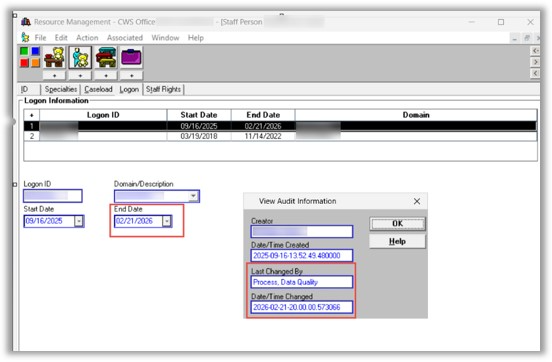
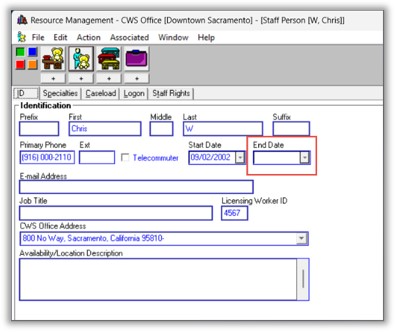
  1. Active User Definition: A "null" end date in the Staff Person screen does not guarantee an active account. A user is only considered Active if they have a valid Log On ID and a record in the USER_ID table. Users end-dated during recent cleanup exercises (90+ days of inactivity) will be migrated to CWS-CARES as Inactive. (see below) 

  • In CWS/CMS, an active user has a blank End Date field (see below) 

Report Column References 

Use this guide to navigate the "County_User Permissions" spreadsheet: 

Column Name 

Description / Logic 

CWS-CMS Staff Person Id 

The unique ID migrated from the CWS legacy system 

First Name 

User's first name 

Last Name 

User's last name 

Email 

User's organization or county email address 

Start Date 

The date the user originally started in the system 

End Date 

If blank (null), the user is still technically active in the system 

User Status 

Active/Inactive. Requires a record in USER_ID and a USER_ID_LAST_ACCESS entry 

  • Logic: If Staff Person exist in USER_ID table, If no entry in USER_ID_LAST_ACCESS, then INACTIVE. if END_DATE is null then ACTIVE,  Else INACTIVE. If Staff Person does not exist in USER_ID table, then INACTIVE. 
  • An active Staff Person does not mean Active User, they need an active Log On ID. See screen captures below. 

County 

The user's assigned County 

Primary Office 

Action Required: Please verify this assignment, as CWS-CARES relies on the Primary Office concept. 

10 

CWS-CMS Privileges 

A comprehensive list of all existing user permissions in CWS/CMS 

11 

CWS-CARES Profile 

Base profile before permissions are assigned. (Currently being consolidated into "caresstaff") 

12 

CWS-CARES Role 

Worker or Supervisor. Logic: If any of the staff Person Unit Authority records for the user is "S" (Supervisor) then this user gets Supervisor level Permissions Else Worker Level Permissions. 

13 

CWS-CARES Permission 

Permissions successfully mapped directly from CWS/CMS privileges. 

14 

CWS-CARES Override Access 

Includes State, County, or Office Read/Write, and Sealed/Sensitive access. 

15 

CWS-CARES Other Override Access 

Includes Closed Edit access, Approval Authority, and Transfer Authority. 

16 

CWS-CARES Office Wide Read Override 

The specific office where the user has "Office-wide Read" access. 

17 

CWS-CARES Office Wide Read-Write Override 

The specific office where the user has "Office-wide Read/Write" access. 

18 

CWS-CARES Administrating Offices 

The office(s) assigned to a user acting as an Office Administrator. 

 Next Steps for Counties and Organizations 

  1. Access your specific county user roster from the Teams channel. 
  1. Review and confirm the accuracy of all mapped roles. 
  1. Make any necessary changes or corrections to existing mappings.  
  1. Add new users and their new CWS-CARES-specific permissions to the spreadsheet. 
  • Edit Options: You may make changes directly to the spreadsheet within Teams, or download a copy, rename it, and upload the updated version. 
  1. By May 1, 2026 (COB): Please submit your finalized list and any net-new permission requests.  
  • Note: If no changes are made by this date, we will automatically add your entire existing county list. By May 4, 2026, we will complete the user provisioning for the V1 Readiness environment, and these users will receive the elevated access levels used during EUST3. 
  1. May 8, 2026 (COB): Final deadline for updates. We will pull this final version to onboard users to production simulation over the May 22nd weekend for the May 26,2026, launch, which will include real data, offices, units, caseloads, and permissions. 

Action Required

Please complete the tasks above by the deadlines noted. Please contact the team at OTSICWDSDataConversion@otsi.ca.gov for any questions.

Last Chance to Order – CWS-CARES Pop-Up Shop Closes This Friday!

CARES SPOCs, Implementation Coordinators, OCM Coordinators, County Leadership, Tribe Leadership, Probation Leadership, and State Leadership:

We are in the final stretch of the CWS-CARES Pop-Up Shop #2 which closes at the end of this week. We’ve received 24 orders to date, but we have 11 items that are currently "at risk" of cancellation because they haven't met the minimum order requirements yet.

To ensure your preferred items are produced, please order by Friday, April 17.

Place your order here: CWS-CARES Pop-Up Shop #2.

For more information about the shop and ordering process, visit our FAQ page: CWS-CARES Pop-Up Shop #2 | FAQs.

We still need orders for:

  • Hanes® Cotton T-Shirts & Dade Polos (Men’s/Women’s)
  • Low-Profile Caps & Non-Woven Tote Bags
  • Recycled Tumblers & Cavetto Ceramic Mugs
  • Notebooks, Pens, Stickers, and Buttons

If minimums aren't met, items are cancelled and not charged.

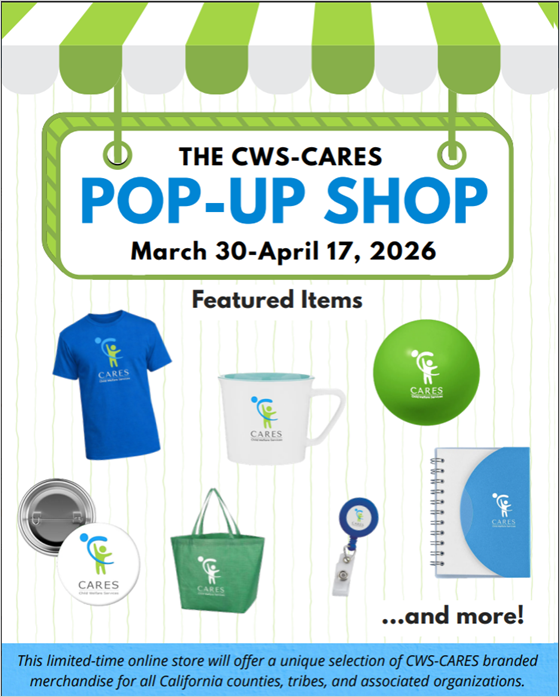
Please share this email and flyer with anyone who may be interested in placing an order. Thank you for your continued partnership and support of the CWS-CARES project!

Action Required

No action required.

If you have any questions, need clarification, or have any accessibility issues, please do not hesitate to contact Customer Relations at CWS_CustRel@otsi.ca.gov.

Announcement: New Implementation Services Vendor for CWS-CARES Version 1

Child Welfare Leadership, CARES SPOCs, CARES Implementation Coordinators, CARES OCM Coordinators

CWS-CARES is pleased to announce that KPMG has been awarded the contract for Implementation Services for CWS-CARES Version 1 (CARES V1). We are moving rapidly with the immediate onboarding of KPMG to ensure a seamless integration into our current operations. 

We are confident that this partnership offers enhanced implementation services. KPMG is committed to providing as much continuity as possible for counties, with some strategic adjustments aimed at improving processes and increasing overall efficiency starting with training, Business Process Reengineering (BPR), and the Production Simulation (Prod Sim) environment. 

Key Updates and Next Steps: 

  1. Project Timeline: CWS-CARES Version 1 remains on track for the October 2026 Go-Live. 
  1. Engagement: Organizational meetings are anticipated to resume in April 2026. You can also expect additional communication and updates in the forthcoming weeks. 
  1. Implementation Leads: More direct communication regarding Implementation Lead assignments will be shared soon. 
  1. Upcoming Information: We will provide a high-level summary of implementation services that includes a training calendar and delivery schedule. 

We understand there are many questions regarding this transition, and we are committed to sharing information as soon as it becomes available. The next opportunity for county updates will be during CWDA week, where we look forward to sharing these developments further. 

Thank you for your continued partnership as we work toward a successful statewide launch of CWS-CARES Version 1. 

CWS/CMS: Cancellation of CWS/CMS Release 9.7

All SPOCs and Technical Contacts:

As stated in the communication sent by CWDS Customer Relations on December 23, 2025, the CWDS Executive Leadership Team has decided to cancel the CWS-CARES Production Pilot. In place of the Production Pilot, CWS-CARES will implement a Production Simulation environment.

The primary focus of CWS/CMS Release 9.7 was to enable IBM to deliver the technical solution required for the planned CWS-CARES Production Pilot. Since this activity is no longer needed for the newly planned CWS-CARES Production Simulation environment, CWS/CMS Release 9.7 is no longer required.

The next scheduled CWS/CMS release will be Release 9.8. The primary focus of this release is to add a mechanism that will allow CWS/CMS to be placed in a read-only state when CWS-CARES is implemented in October 2026. The CWDS Project is currently working with IBM to determine how many, if any, Data Quality improvement System Change Requests (SCRs) can be included with this release.

Release 9.8 is the projected final release for CWS/CMS. It is tentatively scheduled for implementation in June 2026. Further information will be announced as the release details are finalized.

Action Required

No action is required. Please forward any questions to CWDS Customer Relations.

Strategic Adjustment for CWS-CARES Readiness – 12/23/2025

Child Welfare Leadership, CWS-CARES Points of Contact: SPOCs, Implementation Coordinators, OCM Coordinators, Probation Points of Contact, Tribe Points of Contact:

Following our October 29, 2025, communication regarding the federal shutdown, APDU, and funding impacts, and in response to recent feedback from our federal partners, strategic adjustments have been made to the CWS-CARES readiness approach. These decisions, made collaboratively with the CWS-CARES Board of Directors, which includes a representative from the County Welfare Directors Association (CWDA), are designed to ensure the successful statewide CWS-CARES Go-Live in October 2026.  

The originally proposed CWS-CARES "Production Pilot" phase, which involved a full cutover for five counties starting in August 2026, is no longer feasible. Continuing with this plan would extend the Go-Live date beyond our current funding timeline, which would be challenging given state and federal budget constraints.

In place of the Production Pilot, we are implementing a Production Simulation environment starting in May 2026. The Production Simulation environment will be made available to 58 counties (child welfare and probation), Tribes with California Title IV-E Agreements, and state partners. Child Welfare Departments (CWDs) in all 58 counties will be expected to participate in the Production Simulation environment. Guidance will be issued to outline these expectations, to be fully executed using remaining and previously allocated Core Constituent Participation (CCP) funding. This environment will mirror the full CWS-CARES Version 1 system. It features CWS/CMS, CARES-Live, and RFA Greenfield converted data for referrals and cases, interfaces, and analytics enabling all participating organizations to test and validate operations in a realistic production-like setting. Converted external system data will be integrated as it becomes available. We are replacing the Production Pilot and planned testing activities with this expanded Production Simulation strategy. 

Child Welfare Digital Services (CWDS) will engage stakeholders to plan the Production Simulation rollout and determine the most effective way to manage county participation in testing and validation activities. The California Department of Social Services (CDSS) will provide further instructions through forthcoming guidance.

Key Benefits: 

  • Statewide Early Access: Rather than limiting early access to a small group of counties, this environment provides access to all staff across all organizations that will be system users. This environment will start to be available five months prior to Go-Live. Guidance on usage and implementation will be forthcoming. 
  • Real-World Validation: The simulation mirrors a live production environment, populated with fully converted data, referrals, and cases from every county. Staff will practice workflows, run reports and forms, perform validation on data, see the workflow with interfaces, and understand how role-based access controls will function.  
  • Enhanced Readiness: Users will simulate actual business processes, enhance their system exposure with hands-on experiences, and coordinate testing and activities collaboratively across organizations. All organizations will practice and utilize the new CWS-CARES Service Desk processes within the context of the new system and its tools (e.g., logging tickets, tracking issues, managing knowledge articles). 

Path Forward Timeline: 

Area of Focus 

Key Activity 

Timeline 

System Completion & Testing 

Complete system development and conduct necessary testing. 

Now until May 2026

Readiness

Continue robust readiness preparation across counties, Tribes with California Title IV-E agreements, and state partners.

Now until October 2026

Production Simulation 

Utilize a Production Simulation environment for readiness activities, testing, data validation, and hands-on system experiences. 

May 2026 – October 2026

Deployment 

CWS-CARES will launch statewide to all users simultaneously. 

October 2026


To support this revised strategy and ensure proactive planning, we are preparing the following: 

  • A standing monthly leadership meeting between the CDSS, the Office of Technology and Solutions Integration (OTSI) Directorates, selected County Human Services Directors, and CWDA: This group will provide guidance and direction on refreshing areas of stakeholder engagement and address escalations as needed to support the successful implementation of CWS‑CARES.
  • Engagement with and seek funding for CalSAWS so that the Foster Care Eligibility Determination (FCED) is available throughout the Production Simulation period:  The ability for counties to test FCED using converted, real case data throughout the Production Simulation period is essential to the success of this approach.
  • Focused areas of stakeholder engagement to support this approach: We will establish three key areas of focus, likely leveraging existing project workgroups, to drive critical input from counties, Tribes with California Title IV-E Agreements, and state partners on key activities to make this approach successful. Beginning in January 2026, we will partner with CWDA to recruit and confirm county participants for these workgroups. These include:
    • Training and Implementation 
    • Production Simulation 
    • Service Desk: Incident Management, Request Fulfillment, Escalation processes, and Interim Governance for system changes 
  • Pilot Workgroup Sunset: The original Pilot workgroup will be dissolved (sunset) as its purpose has been superseded by Production Simulation and the statewide readiness focus.
  • Communication Evaluation: We will also gather feedback on our communication channels and improve how we support you through this transition. We want to identify exactly what is working and where we need to adjust our outreach to better support you. 

This is a significant change driven by external constraints and is imperative to meet our October 2026 Go-Live date. We acknowledge the challenges for all organizational partners and reaffirm our commitment to support readiness efforts. Your partnership remains vital as we proceed with this refined path to a successful statewide CWS-CARES implementation in October 2026. 

Action Required

No action is required.

CWS/CMS: System Change Request (SCR) for Proposed Automated CWS/CMS User ID Clean Up

All SPOCs and Technical Contacts:

To assist counties with cleanup of CWS/CMS user accounts and to correctly determine the number of accounts needed in CWS-CARES, an automated approach to deactivate inactive CWS/CMS user accounts has been proposed with System Change Request (SCR) 9039. To align with CWS-CARES user account administration, the SCR will deactivate user accounts that have not logged into CWS/CMS within the previous 90 days. Of the current 30,700 active user accounts in CWS/CMS, approximately 8,900 accounts have not logged in within the previous 90 days.

Important notes regarding this proposed automated process:

  • All User IDs (active and inactive) will be migrated from CWS/CMS to CWS-CARES;
  • The SCR will be developed outside of traditional CWS/CMS Release timelines;
  • It is expected that a large first-run for deactivating CWS/CMS User IDs will be followed by a smaller run prior to moving to CWS-CARES;
  • A county can change a user from inactive to active within CWS-CARES once migrated (provided a valid current email is used);
  • Once CWS-CARES is live, the user accounts will automatically be deactivated if the user has not logged in a 90-day period.

Exact details on the functionality of the SCR are still being developed. Design and development is expected to be completed by the end of December 2025. After internal testing, the change is anticipated to run in the CWS/CMS production application by the end of January 2026. Updates will be provided as the details and schedule are finalized.

Action Required

Send questions and/or concerns regarding this automated process to the Data Quality portal’s mailbox at CWSDataQuality@otsi.ca.gov.