
CWS-CARES

CWS-CARES Production Simulation – Please Review & Refine User Permissions by 05/01/2026 

CARES SPOCs, Technical Contacts, Implementation Coordinators, OCM Coordinators, County Leadership, Tribe Leadership, Probation Leadership, and State Leadership:

Following the CWS-CARES Production Simulation – Please Identify Initial Users communication sent last Monday, April 20, 2026, the new County User Permissions spreadsheets are now available in the CWS-CARES User Onboarding Preparation Microsoft Teams channel.  

These lists contain all active and inactive CWS/CMS users for both Child Welfare and Probation to facilitate conversion for Production Simulation roles and permissions. Please note that these updates apply only to Production Simulation; a future activity will be conducted to confirm all roles and permissions for the final CWS-CARES Production environment prior to Go-Live. 

Access to the CWS-CARES User Onboarding Preparation Microsoft Teams channel is currently limited to CWS-CARES SPOCs and those that requested access last week. If you need access, please contact the Identity Access Management (IAM) Team at otsicwdscaresorgiamteam@otsi.ca.gov .  

Here are the basic steps to validate legacy CWS/CMS permissions to the new CWS-CARES. 

  1. Validate Primary Office & Mapping: Review the matrix to ensure the assigned Primary Office is correct. Verify that the Permission Sets mapped from CWS/CMS to CWS-CARES accurately reflect the user's needs. 
  1. Assign Net-New Permissions: Review the list of permissions unique to CWS-CARES (those with no legacy equivalent). Determine which staff members require these new permission sets and update the roster accordingly. 

To accurately review the spreadsheets, please keep these system logic changes in mind: 

  1. Permissions Snapshot: All information reflects CWS/CMS production data as of March 11, 2026. 
  1. Permission Hierarchy 
  • Consolidated Permissions: Unlike CWS/CMS, CWS-CARES does not require multiple overlapping permissions. Higher-level access (e.g., County Read/Write) automatically overrides lower levels (Office or Unit). If a user has County, Office, and Unit access, CWS-CARES will only assign the highest level (County). 
  • Discontinued Roles: "Unit Read" and "Unit Read/Write" roles no longer exist in in CWS-CARES. 
  1. Role Determination 
  • Supervisor vs. Worker: If a user has an "S" (Supervisor) designation in any Staff Person Unit Authority record, they are automatically mapped to Supervisor permissions in CWS-CARES. Otherwise, they default to Worker. 
  • Functional Mapping: The CWS/CMS Case Management role to CWS-CARES Hotline, ER, and Case Management modules. 
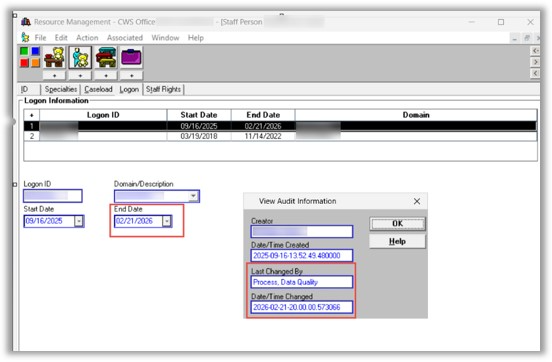
  1. Active User Definition: A "null" end date in the Staff Person screen does not guarantee an active account. A user is only considered Active if they have a valid Log On ID and a record in the USER_ID table. Users end-dated during recent cleanup exercises (90+ days of inactivity) will be migrated to CWS-CARES as Inactive. (see below) 
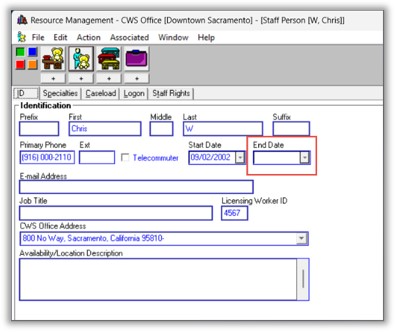
  • In CWS/CMS, an active user has a blank End Date field (see below) 
Report Column References 

Use this guide to navigate the "County_User Permissions" spreadsheet: 

# 

Column Name 

Description / Logic 

1 

CWS-CMS Staff Person Id 

The unique ID migrated from the CWS legacy system 

2 

First Name 

User's first name 

3 

Last Name 

User's last name 

4 

Email 

User's organization or county email address 

5 

Start Date 

The date the user originally started in the system 

6 

End Date 

If blank (null), the user is still technically active in the system 

7 

User Status 

Active/Inactive. Requires a record in USER_ID and a USER_ID_LAST_ACCESS entry 

  • Logic: If Staff Person exist in USER_ID table, If no entry in USER_ID_LAST_ACCESS, then INACTIVE. if END_DATE is null then ACTIVE,  Else INACTIVE. If Staff Person does not exist in USER_ID table, then INACTIVE. 
  • An active Staff Person does not mean Active User, they need an active Log On ID. See screen captures below. 

8 

County 

The user's assigned County 

9 

Primary Office 

Action Required: Please verify this assignment, as CWS-CARES relies on the Primary Office concept. 

10 

CWS-CMS Privileges 

A comprehensive list of all existing user permissions in CWS/CMS 

11 

CWS-CARES Profile 

Base profile before permissions are assigned. (Currently being consolidated into "caresstaff") 

12 

CWS-CARES Role 

Worker or Supervisor. Logic: If any of the staff Person Unit Authority records for the user is "S" (Supervisor) then this user gets Supervisor level Permissions Else Worker Level Permissions. 

13 

CWS-CARES Permission 

Permissions successfully mapped directly from CWS/CMS privileges. 

14 

CWS-CARES Override Access 

Includes State, County, or Office Read/Write, and Sealed/Sensitive access. 

15 

CWS-CARES Other Override Access 

Includes Closed Edit access, Approval Authority, and Transfer Authority. 

16 

CWS-CARES Office Wide Read Override 

The specific office where the user has "Office-wide Read" access. 

17 

CWS-CARES Office Wide Read-Write Override 

The specific office where the user has "Office-wide Read/Write" access. 

18 

CWS-CARES Administrating Offices 

The office(s) assigned to a user acting as an Office Administrator. 

 Next Steps for Counties and Organizations 

  1. Access your specific county user roster from the Teams channel. 
  1. Review and confirm the accuracy of all mapped roles. 
  1. Make any necessary changes or corrections to existing mappings.  
  1. Add new users and their new CWS-CARES-specific permissions to the spreadsheet. 
  • Edit Options: You may make changes directly to the spreadsheet within Teams, or download a copy, rename it, and upload the updated version. 
  1. By May 1, 2026 (COB): Please submit your finalized list and any net-new permission requests.  
  • Note: If no changes are made by this date, we will automatically add your entire existing county list. By May 4, 2026, we will complete the user provisioning for the V1 Readiness environment, and these users will receive the elevated access levels used during EUST3. 
  1. May 8, 2026 (COB): Final deadline for updates. We will pull this final version to onboard users to production simulation over the May 22nd weekend for the May 26, 2026, launch, which will include real data, offices, units, caseloads, and permissions. 

Action Required

Please complete the tasks above by the deadlines noted. Please contact the team at OTSICWDSDataConversion@otsi.ca.gov for any questions.
CWS-CARES Implementation Update: Timeline and Implementation Lead Assignments 

CARES SPOCs, Implementation Coordinators, OCM Coordinators, County Leadership, Tribe Leadership, Probation Leadership, and State Leadership:

As we move closer to the statewide launch of CWS-CARES this October, we want to provide you with an update on our implementation roadmap and the team dedicated to supporting your organizations through this transition. 

Attached are the Implementation Lead (IL) Assignments and a high-level timeline encompassing key activities across Implementation, Organizational Change Management (OCM), and Training. This overview outlines the major milestones leading up to our Go-Live, with a focus on the following upcoming phases: 

  • Train-the-Trainer/Super Users training: We are combining Train-the-Trainer and Super User sessions into a single, streamlined curriculum. Starting in late June 2026, multiple sessions will be offered throughout an eight-week window to accommodate schedules. 
  • End User Instructor-Led Training: Beginning in August 2026, leading up to the CWS-CARES Version Go-Live in October 2026. 

The team is currently working on the detailed plans for these activities, and we look forward to sharing more information with you in May. 

With the successful restart of our monthly Implementation Readiness meetings on April 13, 2026 we have confirmed interim Implementation Lead (IL) assignments for both Child Welfare and Probation. Please find the current assignment roster attached. 

As we continue to onboard resources and assess the specific needs of each organization, please note that there may be further adjustments to these assignments in June. These updates will ensure that every partner receives the dedicated support required for a successful transition. 

We appreciate your ongoing partnership as we continue to prepare for these significant milestones. 

Action Required:  
No action is required.

New Resource: The CWS-CARES FCED Hub - REMINDER

Regional Training Academy Leads:

April 16, 2026 UPDATE: Reminder: Send an email to the CWDS Customer Relations mailbox at CWS_CustRel@otsi.ca.gov to request CWS-CARES FCED Hub access for RTA staff.

_______________________________________________________________________________

The CWS-CARES Project recently launched the FCED Hub, a centralized resource for information related to Foster Care Eligibility and Determination (FCED). FCED is the interface between CalSAWS and CWS-CARES to facilitate the determination of foster care funding in California, and replaces or augments information currently provided by social workers to eligibility workers. The FCED Hub includes eligibility demonstrations, FAQs, meeting recordings and materials, and CalSAWS FCED newsletters. We invite you to access the Hub to learn more about the FCED interface and better prepare for the upcoming implementation of CWS-CARES. 

How to Access the FCED Hub 
Regional Training Academy Leads can access the Hub by creating an account on the CWDS website:  

  1. Sign up at Account Sign Up | CWDS  
  2. Enter your name, email, county, and create a password 
  3. Select the county from the dropdown that best represents your region 
  4. Log in using your CWDS credentials  
  5. Navigate to the CWDS Portals page and enter the FCED Hub  

Once you have created an account, you will have access to all resources on the CWDS website, including the Hub. 

Requesting Access for RTA Staff 

RTA Leads are responsible for requesting access to the FCED Hub on behalf of their staff. To request access for RTA staff, email Customer Relations at CWS_CustRel@otsi.ca.gov with their full name, email address, and RTA region. Staff will receive an email communication with instructions to create a CWDS account and log in. 

Action Required

Email Customer Relations at CWS_CustRel@otsi.ca.gov to request FCED Hub access for RTA staff.

Last Chance to Order – CWS-CARES Pop-Up Shop Closes This Friday!

CARES SPOCs, Implementation Coordinators, OCM Coordinators, County Leadership, Tribe Leadership, Probation Leadership, and State Leadership:

We are in the final stretch of the CWS-CARES Pop-Up Shop #2 which closes at the end of this week. We’ve received 24 orders to date, but we have 11 items that are currently "at risk" of cancellation because they haven't met the minimum order requirements yet.

To ensure your preferred items are produced, please order by Friday, April 17.

Place your order here: CWS-CARES Pop-Up Shop #2.

For more information about the shop and ordering process, visit our FAQ page: CWS-CARES Pop-Up Shop #2 | FAQs.

We still need orders for:

  • Hanes® Cotton T-Shirts & Dade Polos (Men’s/Women’s)
  • Low-Profile Caps & Non-Woven Tote Bags
  • Recycled Tumblers & Cavetto Ceramic Mugs
  • Notebooks, Pens, Stickers, and Buttons

If minimums aren't met, items are cancelled and not charged.

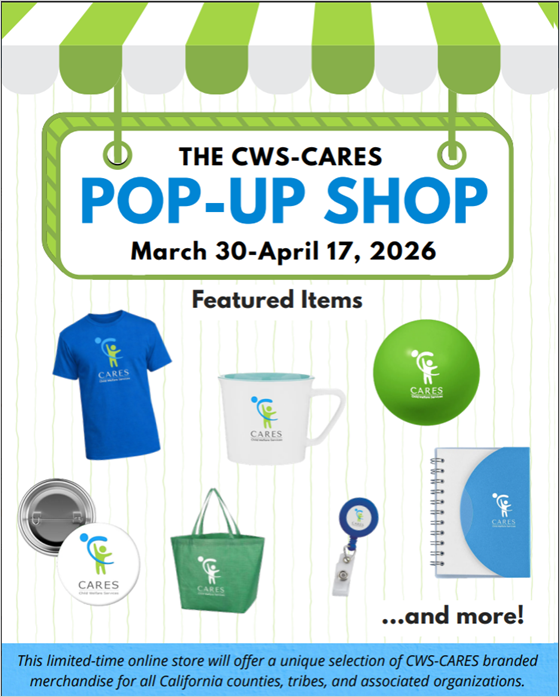
Please share this email and flyer with anyone who may be interested in placing an order. Thank you for your continued partnership and support of the CWS-CARES project!

Action Required

No action required.

If you have any questions, need clarification, or have any accessibility issues, please do not hesitate to contact Customer Relations at CWS_CustRel@otsi.ca.gov.

New Resource: The CWS-CARES FCED Hub

Regional Training Academy Leads:

The CWS-CARES Project recently launched the FCED Hub, a centralized resource for information related to Foster Care Eligibility and Determination (FCED). FCED is the interface between CalSAWS and CWS-CARES to facilitate the determination of foster care funding in California, and replaces or augments information currently provided by social workers to eligibility workers. The FCED Hub includes eligibility demonstrations, FAQs, meeting recordings and materials, and CalSAWS FCED newsletters. We invite you to access the Hub to learn more about the FCED interface and better prepare for the upcoming implementation of CWS-CARES. 

How to Access the FCED Hub 
Regional Training Academy Leads can access the Hub by creating an account on the CWDS website:  

  1. Sign up at Account Sign Up | CWDS  
  2. Enter your name, email, county, and create a password 
  3. Select the county from the dropdown that best represents your region 
  4. Log in using your CWDS credentials  
  5. Navigate to the CWDS Portals page and enter the FCED Hub  

Once you have created an account, you will have access to all resources on the CWDS website, including the Hub. 

Requesting Access for RTA Staff 

RTA Leads are responsible for requesting access to the FCED Hub on behalf of their staff. To request access for RTA staff, email Customer Relations at CWS_CustRel@otsi.ca.gov with their full name, email address, and RTA region. Staff will receive an email communication with instructions to create a CWDS account and log in. 

Action Required

Email Customer Relations at CWS_CustRel@otsi.ca.gov to request FCED Hub access for RTA staff.

New Materials Available on the CWS-CARES FCED Hub

FCED Governance Committee Members:

Following our February 9, 2026 Governance Committee meeting, two new resources are now available on the CWS-CARES FCED Hub:

  • February 2026 Governance Committee materials — including the meeting recording, presentation slides, and agenda
  • Monthly CalSAWS FCED newsletters — with instructions on how to access the new CalSAWS FCED demonstration series, which shows how information from CWS-CARES is displayed for the CalSAWS user, processed, and how information is returned to CWS-CARES as appropriate.

Based on your feedback from the meeting, we have also expanded FCED Hub access to our Regional Training Academy partners.

We will continue adding materials to the FCED Hub as they become available.

Action Required

Please contact CWDS Customer Relations with any questions.

CWS-CARES Weekly Digest - April 6, 2026

CARES SPOCs, Implementation Coordinators, OCM Coordinators, County Leadership, Tribe Leadership, Probation Leadership, and State Leadership:

In this Weekly Digest: 

  • Two Weeks Left: Order Now at the CWS-CARES Pop-Up Shop! 
  • CWS-CARES Core Constituent Demonstration
  • CWS-CARES Frequently Asked Question (FAQ) of the Week 

_______

Two Weeks Left: Order Now at the CWS-CARES Pop-Up Shop! 

There is still time to order from the CWS-CARES Pop-Up Shop #2! The shop will remain open until end of day on Friday, April 17, 2026. Place your orders at: CWS-CARES Pop-Up Shop #2 | Order Now . 

The shop is open to all 58 California counties, Tribes, and partner organizations. CWS-CARES branded items are available for purchase using your own funds. For ordering and shipping details, please reference the CWS-CARES Pop-Up Shop #2 FAQs and Item Preview document.  

Please contact CWDS Customer Relations with any questions. Happy shopping! 

_______

CWS-CARES Core Constituent Demonstration

Here is a quick look at the CWS-CARES Core Constituent Demonstrations from the previous and upcoming two weeks. These demonstrations give counties and partners a chance to see key features in action, learn what’s new or coming soon, and share feedback that helps shape ongoing improvements to CWS-CARES.

View all the previous Product Demonstrations on the CWDS website: CWS-CARES Product Demonstrations. Please note, a log in is required to view all recordings. 

CWS-CARES Core Constituent Demonstrations Held March 23 - April 3, 2026: 

  • No CWS-CARES Core Constituent Demonstrations were held between March 23 – April 3. 

Upcoming CWS-CARES Core Constituent Demonstrations: *  

  • No CWS-CARES Core Constituent Demonstrations are currently planned between April 6 – April 30.  

*Please note that dates for CWS-CARES Demonstrations shared here are subject to change. Please check the CWDS Meeting and Event Calendar for the most up-to-date schedule. 

_______

CWS-CARES Frequently Asked Question (FAQ) of the Week

Each week, we highlight a common question from counties and partners, along with a clear, practical answer to help you better understand CWS-CARES functionality

April 6, 2026 FAQ of the Week:

Q: Will CWS-CARES incorporate Safety Organized Practice (SOP)? This is the state approved model approach we use in practice. 

A: CWS-CARES incorporates elements aligned with Safety Organized Practice (SOP) where appropriate within system functionality. For example, provisional Harm and Danger Statements are available at Intake (Screening) and can be further developed throughout the referral and case lifecycle. Additionally, SOP-aligned language has been integrated into relevant areas of the system, including structured contact notes and other documentation features, where applicable. 

To view all of the CWS-CARES FAQs, please visit the CWDS Website: CWS-CARES FAQs | CWDS Website. Have a question?  Send it to Customer Relations at  CWS_CustRel@otsi.ca.gov and we will be happy to help.

_______

Share Your Feedback and Subscribe 

Thank you for following our progress! Share your feedback on this CWS-CARES Weekly Digest here: CWS-CARES Weekly Digest Feedback Form. Subscribe to future issues here: CWS-CARES Weekly Digest Subscription Form.

_______

Action Required

We request that all CWS-CARES Single Point of Contacts (SPOCs) and Implementation Coordinators coordinate and distribute the CWS-CARES Weekly Digest to all staff impacted by CWS-CARES, at their discretion.

CWS-CARES: Action Required: Recruitment Request for CWS-CARES FFPSA Portal Testers

CARES SPOCs, Implementation Coordinators, County Leadership, Tribe Leadership, Probation Leadership, and State Leadership:

As noted in our recent update regarding Family First Prevention Services Act (FFPSA) Portal testing as part of CWS-CARES Extended User Scenario Testing (EUST) 3, we are shifting to a more focused testing approach utilizing a smaller group of subject matter experts (SMEs). We are now requesting your assistance in recruiting specific testers from your organization to participate in this effort.

Tester Pairing and Roles

To ensure the FFPSA Portal is tested comprehensively from front to back, testers must be paired across two distinct roles. Each tester can only fill one of the following roles:

  1. CBO (Community-Based Organization) Tester
  2. CWS-CARES User

Staffing Requirements per Participating County

  1. At least one person for each role (CBO and CWS-CARES User).
  2. A total of two staff members for each set of testers (one per role) in each participating organization.

Recommended Background for Tester Roles

  • CBO Tester Role: SMEs with a background in Prevention Services, and individuals with previous EUST experience are preferred. Note: County staff may act as CBO testers; however, this requires a separate external email address (non-county email) for portal access.
  • CWS-CARES Users Role: Individuals with familiarity in FFPSA, case management, and financial management, previous EUST experience is preferred.

We anticipate a commitment of five (5) to ten (10) hours per week over the planned two-week testing timeframe of April 6 – 17, 2026. We will provide a finalized schedule and specific dates as soon as they are confirmed.

Please respond using this form: EUST 3 FFPSA Portal Tester Registration and provide your designated testers' names and contact information by end of day Monday, March 30, 2026. Once your testers have been identified and submitted, the designated staff will receive training invitations directly from the CWS-CARES Training team. These invitations will include the specific dates, times, and logistical details for the upcoming sessions.

Thank you for your partnership in ensuring the CWS-CARES FFPSA Portal meets the needs of our statewide users.


Action Required

Please respond using this form: EUST 3 FFPSA Portal Tester Registration and provide your designated testers' names and contact information by end of day Monday, March 30, 2026.

CWS-CARES Scheduled Maintenance - March 31, 2026 | 5PM - 8PM

All Pilot County RFA Implementation Coordinators and SPOCs:

The CWS-CARES team has scheduled maintenance activity for the CWS-CARES production environment for Tuesday, March 31, 2026, beginning at 5:00 PM and concluding at 8:00 PM. During the maintenance window, the CWS-CARES Resource Family Approval (RFA) Application Submission, Review, and Approval Process will be accessible for pilot counties Fresno, Placer, and Santa Clara.

During the maintenance window, document related functionality in the CARES application will not be accessible.

Action Required

No action required from end-users during this maintenance window.

If users experience any issues with the CWS-CARES, please follow your county process for reporting issues. CWS-CARES County Administrators may contact the CARES Service Desk through the CWDS ServiceNow Customer Support Management (CSM) Portal. Alternate methods are phoning 1-855-292-3444 or via email at Servicedesk@cwds.ca.gov during normal business hours. You may also email after hours, and a Service Desk representative will contact you the next business day.

Announcement: New Implementation Services Vendor for CWS-CARES Version 1

Child Welfare Leadership, CARES SPOCs, CARES Implementation Coordinators, CARES OCM Coordinators

CWS-CARES is pleased to announce that KPMG has been awarded the contract for Implementation Services for CWS-CARES Version 1 (CARES V1). We are moving rapidly with the immediate onboarding of KPMG to ensure a seamless integration into our current operations. 

We are confident that this partnership offers enhanced implementation services. KPMG is committed to providing as much continuity as possible for counties, with some strategic adjustments aimed at improving processes and increasing overall efficiency starting with training, Business Process Reengineering (BPR), and the Production Simulation (Prod Sim) environment. 

Key Updates and Next Steps: 

  1. Project Timeline: CWS-CARES Version 1 remains on track for the October 2026 Go-Live. 
  1. Engagement: Organizational meetings are anticipated to resume in April 2026. You can also expect additional communication and updates in the forthcoming weeks. 
  1. Implementation Leads: More direct communication regarding Implementation Lead assignments will be shared soon. 
  1. Upcoming Information: We will provide a high-level summary of implementation services that includes a training calendar and delivery schedule. 

We understand there are many questions regarding this transition, and we are committed to sharing information as soon as it becomes available. The next opportunity for county updates will be during CWDA week, where we look forward to sharing these developments further. 

Thank you for your continued partnership as we work toward a successful statewide launch of CWS-CARES Version 1.