
CARES SPOCs, Technical Contacts, Implementation Coordinators, OCM Coordinators, County Leadership, Tribe Leadership, Probation Leadership, and State Leadership:
Following the CWS-CARES Production Simulation – Please Identify Initial Users communication sent last Monday, April 20, 2026, the new County User Permissions spreadsheets are now available in the CWS-CARES User Onboarding Preparation Microsoft Teams channel.
These lists contain all active and inactive CWS/CMS users for both Child Welfare and Probation to facilitate conversion for Production Simulation roles and permissions. Please note that these updates apply only to Production Simulation; a future activity will be conducted to confirm all roles and permissions for the final CWS-CARES Production environment prior to Go-Live.
Access to the CWS-CARES User Onboarding Preparation Microsoft Teams channel is currently limited to CWS-CARES SPOCs and those that requested access last week. If you need access, please contact the Identity Access Management (IAM) Team at otsicwdscaresorgiamteam@otsi.ca.gov .
Here are the basic steps to validate legacy CWS/CMS permissions to the new CWS-CARES.
- Validate Primary Office & Mapping: Review the matrix to ensure the assigned Primary Office is correct. Verify that the Permission Sets mapped from CWS/CMS to CWS-CARES accurately reflect the user's needs.
- Assign Net-New Permissions: Review the list of permissions unique to CWS-CARES (those with no legacy equivalent). Determine which staff members require these new permission sets and update the roster accordingly.
To accurately review the spreadsheets, please keep these system logic changes in mind:
- Permissions Snapshot: All information reflects CWS/CMS production data as of March 11, 2026.
- Permission Hierarchy
- Consolidated Permissions: Unlike CWS/CMS, CWS-CARES does not require multiple overlapping permissions. Higher-level access (e.g., County Read/Write) automatically overrides lower levels (Office or Unit). If a user has County, Office, and Unit access, CWS-CARES will only assign the highest level (County).
- Discontinued Roles: "Unit Read" and "Unit Read/Write" roles no longer exist in in CWS-CARES.
- Role Determination
- Supervisor vs. Worker: If a user has an "S" (Supervisor) designation in any Staff Person Unit Authority record, they are automatically mapped to Supervisor permissions in CWS-CARES. Otherwise, they default to Worker.
- Functional Mapping: The CWS/CMS Case Management role to CWS-CARES Hotline, ER, and Case Management modules.
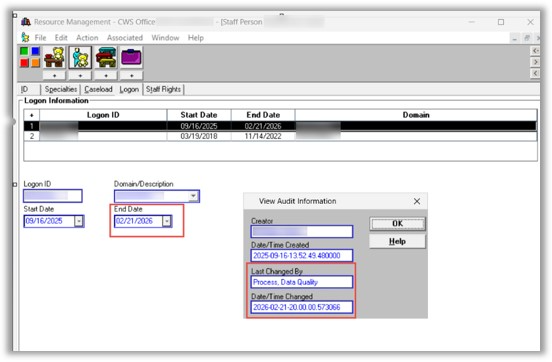
- Active User Definition: A "null" end date in the Staff Person screen does not guarantee an active account. A user is only considered Active if they have a valid Log On ID and a record in the USER_ID table. Users end-dated during recent cleanup exercises (90+ days of inactivity) will be migrated to CWS-CARES as Inactive. (see below)
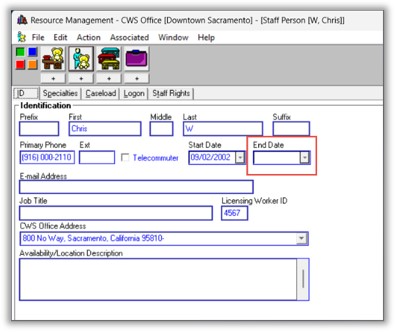
- In CWS/CMS, an active user has a blank End Date field (see below)
Report Column References
Use this guide to navigate the "County_User Permissions" spreadsheet:
|
# |
Column Name |
Description / Logic |
|
1 |
CWS-CMS Staff Person Id |
The unique ID migrated from the CWS legacy system |
|
2 |
First Name |
User's first name |
|
3 |
Last Name |
User's last name |
|
4 |
|
User's organization or county email address |
|
5 |
Start Date |
The date the user originally started in the system |
|
6 |
End Date |
If blank (null), the user is still technically active in the system |
|
7 |
User Status |
Active/Inactive. Requires a record in USER_ID and a USER_ID_LAST_ACCESS entry
|
|
8 |
County |
The user's assigned County |
|
9 |
Primary Office |
Action Required: Please verify this assignment, as CWS-CARES relies on the Primary Office concept. |
|
10 |
CWS-CMS Privileges |
A comprehensive list of all existing user permissions in CWS/CMS |
|
11 |
CWS-CARES Profile |
Base profile before permissions are assigned. (Currently being consolidated into "caresstaff") |
|
12 |
CWS-CARES Role |
Worker or Supervisor. Logic: If any of the staff Person Unit Authority records for the user is "S" (Supervisor) then this user gets Supervisor level Permissions Else Worker Level Permissions. |
|
13 |
CWS-CARES Permission |
Permissions successfully mapped directly from CWS/CMS privileges. |
|
14 |
CWS-CARES Override Access |
Includes State, County, or Office Read/Write, and Sealed/Sensitive access. |
|
15 |
CWS-CARES Other Override Access |
Includes Closed Edit access, Approval Authority, and Transfer Authority. |
|
16 |
CWS-CARES Office Wide Read Override |
The specific office where the user has "Office-wide Read" access. |
|
17 |
CWS-CARES Office Wide Read-Write Override |
The specific office where the user has "Office-wide Read/Write" access. |
|
18 |
CWS-CARES Administrating Offices |
The office(s) assigned to a user acting as an Office Administrator. |
Next Steps for Counties and Organizations
- Access your specific county user roster from the Teams channel.
- Review and confirm the accuracy of all mapped roles.
- Make any necessary changes or corrections to existing mappings.
- Add new users and their new CWS-CARES-specific permissions to the spreadsheet.
- Edit Options: You may make changes directly to the spreadsheet within Teams, or download a copy, rename it, and upload the updated version.
- By May 1, 2026 (COB): Please submit your finalized list and any net-new permission requests.
- Note: If no changes are made by this date, we will automatically add your entire existing county list. By May 4, 2026, we will complete the user provisioning for the V1 Readiness environment, and these users will receive the elevated access levels used during EUST3.
- May 8, 2026 (COB): Final deadline for updates. We will pull this final version to onboard users to production simulation over the May 22nd weekend for the May 26, 2026, launch, which will include real data, offices, units, caseloads, and permissions.
Action Required
Please complete the tasks above by the deadlines noted. Please contact the team at OTSICWDSDataConversion@otsi.ca.gov for any questions.