
All SPOCs:
The CWDS Office has decided to remove the CWDS Contacts pages from the public-facing website, available to all users. Instead, to view this contact information, a user must first log in with a valid email address recognized by an organizational email domain. A user trying to access this ‘Contacts’ section will be required to enter log-in credentials for the CWDS website if they have not already logged in. This change was implemented today, December 16, 2024.
Action Required
No action required. Users may self-register to ‘Behind County Login’ by signing up with a valid organizational email domain to access the County Contacts, and all other sections of the CWDS website requiring recognized login credentials.
CWDS Bulletins
CWS/CMS: Remote County Testing - Release 9.6 Improved CWS/CMS Data Quality in Preparation for Import to CARES, Phase 3
All SPOCs and Training Contacts:
The Child Welfare Digital Services (CWDS) Office is requesting county staff to participate in the Release 9.6 County Test Workshop (CTW). Registered testers will participate in the testing of Release 9.6 Data Quality SCRs, which is scheduled for delivery to the Counties on May 17, 2025.
The CTW for Release 9.6 will be conducted in a remote setting via Remote Desktop Protocol (RDP) workstations.
The deadline to register is Thursday, January 9, 2025
System Change Requests (SCRs) included in this release are:
Remote CTW sessions will take place in the morning from 9:00AM - 12:00PM and again in the afternoon from 1:00PM – 4:00PM on the following dates:
R9.6 Data Quality SCRs in the VB6 Environment
CWDS is seeking a total of fifteen (15) County staff members for each of the following twelve (12) sessions (2 sessions per day):
Tuesday, February 4, 2025 (AM or PM session)
Wednesday, February 5, 2025 (AM or PM session)
Thursday, February 6, 2025 (AM or PM session)
Tuesday, February 11, 2025 (AM or PM session)
Wednesday, February 12, 2025 (AM or PM session)
Thursday, February 13, 2025 (AM or PM session)
R9.6 Data Quality SCRs in C# Environment
CWDS is seeking fifteen (15) County staff members for each of the C# fourteen (14) sessions (2 sessions per day).
Tuesday, April 1, 2025 (AM or PM session)
Wednesday, April 2, 2025 (AM or PM session)
Thursday, April 3, 2025 (AM or PM session)
Monday, April 7, 2025 (AM or PM session)
Tuesday, April 8, 2025 (AM or PM session)
Wednesday, April 9, 2025 (AM or PM session)
Thursday, April 10, 2025 (AM or PM session)
Participants are welcome to register for any of the sessions listed above in half or whole-day increments.
We encourage you to submit your request for a specific session as soon as possible, but no later than 5:00 PM on January 9, 2025. If a session’s count exceeds the maximum count, Customer Relations will work with that tester to be rescheduled for another session. Thank you in advance for your cooperation.
A Release 9.6 CTW Online Registration Form (see link below) for each potential tester must be received as soon as possible but no later than 5:00 PM on January 9, 2025, so the CWDS office can finalize the needed arrangements.
Link: https://forms.gle/cBBQdesgqUYpc5eA6
The CWDS Office will work with the registered testers on all the details of their CTW participation.
Special Note: The County data will be pulled from the Production environment and copied to the CTW environment at the close of business on Tuesday, January 14, 2025. Therefore, changes to your Production environment after this date will not be in the CTW environment.
If you cannot access the Online Registration Form or have any questions regarding this recruitment, please contact CWS_CustRel@osi.ca.gov.
Your continued support of CWDS is greatly appreciated.
Action Required
Submit a Release 9.6 County Test Workshop Online Registration Form no later than 5:00 PM on January 9, 2025.
The Child Welfare Digital Services (CWDS) Office is requesting county staff to participate in the Release 9.6 County Test Workshop (CTW). Registered testers will participate in the testing of Release 9.6 Data Quality SCRs, which is scheduled for delivery to the Counties on May 17, 2025.
The CTW for Release 9.6 will be conducted in a remote setting via Remote Desktop Protocol (RDP) workstations.
The deadline to register is Thursday, January 9, 2025
System Change Requests (SCRs) included in this release are:
- SCR 8982 - Add Missing Name for Placement Homes for CARES
- SCR 8983 - Add Missing Name for Non-Foster Care Facilities for CARES
- SCR 8999 - Update Client Dates out-of-range for CARES
- SCR 8985 - Make Name Mandatory for Non-Foster Care Facility
- SCR 8989 - Cleanup Outdated Home Studies
- SCR 8843 - Transfer Enrollment between DOE Schools
- SCR 8967 - Duplicate Hearing Notebook Warning
- SCR 8972 - ACL 22-95 ICWA Eligibility Data Entry Mandatory Fields (Part B)
- SCR 8943 - Expand Merge History Log
- SCR 9020 - R9.6 Training Tools Package
Remote CTW sessions will take place in the morning from 9:00AM - 12:00PM and again in the afternoon from 1:00PM – 4:00PM on the following dates:
R9.6 Data Quality SCRs in the VB6 Environment
CWDS is seeking a total of fifteen (15) County staff members for each of the following twelve (12) sessions (2 sessions per day):
Tuesday, February 4, 2025 (AM or PM session)
Wednesday, February 5, 2025 (AM or PM session)
Thursday, February 6, 2025 (AM or PM session)
Tuesday, February 11, 2025 (AM or PM session)
Wednesday, February 12, 2025 (AM or PM session)
Thursday, February 13, 2025 (AM or PM session)
R9.6 Data Quality SCRs in C# Environment
CWDS is seeking fifteen (15) County staff members for each of the C# fourteen (14) sessions (2 sessions per day).
Tuesday, April 1, 2025 (AM or PM session)
Wednesday, April 2, 2025 (AM or PM session)
Thursday, April 3, 2025 (AM or PM session)
Monday, April 7, 2025 (AM or PM session)
Tuesday, April 8, 2025 (AM or PM session)
Wednesday, April 9, 2025 (AM or PM session)
Thursday, April 10, 2025 (AM or PM session)
Participants are welcome to register for any of the sessions listed above in half or whole-day increments.
We encourage you to submit your request for a specific session as soon as possible, but no later than 5:00 PM on January 9, 2025. If a session’s count exceeds the maximum count, Customer Relations will work with that tester to be rescheduled for another session. Thank you in advance for your cooperation.
A Release 9.6 CTW Online Registration Form (see link below) for each potential tester must be received as soon as possible but no later than 5:00 PM on January 9, 2025, so the CWDS office can finalize the needed arrangements.
Link:
The CWDS Office will work with the registered testers on all the details of their CTW participation.
Special Note: The County data will be pulled from the Production environment and copied to the CTW environment at the close of business on Tuesday, January 14, 2025. Therefore, changes to your Production environment after this date will not be in the CTW environment.
If you cannot access the Online Registration Form or have any questions regarding this recruitment, please contact CWS_CustRel@osi.ca.gov.
Your continued support of CWDS is greatly appreciated.
Action Required
Submit a Release 9.6 County Test Workshop Online Registration Form no later than 5:00 PM on January 9, 2025.
CWS/CMS Release 9.5 and Interim Release 9.5.0 (3-Day Reminder) Bulletin
Release 9.5 will be implemented on Saturday, December 14, 2024
The application outage begins on Saturday, December 14, 2024, at 5:00 AM and will most likely complete around 11:00 AM. Users will not be able to access the CWS/CMS application during this period. All application updates will be applied during this outage and should be available once the outage is complete.
Note: Business Objects will be unavailable from approximately 8 AM to 11 AM while the Release 9.5 updates are being applied.
Customer support will be available from the IBM Helpdesk at (800) 428-8268.
Coexistent county CWSCMS.MSI file availability:
The CWSCMS.MSI file was made available on Friday, December 6, 2024, for technical staff to begin testing the installation of the release. The code is located on the CWSDFSr share in the following location:
By Friday, December 6, 2024, dedicated county users should have started seeing the CWSCMS.MSI file copied to their workstations during Windows logon. Technical staff can verify that they have received the file by checking for its presence in the C:\CACW\R95 folder. This file must exist on the workstation for the installation of Release 9.5 to take place on or after December 14, 2024.
Dedicated County users should do the following on the night before the release:
The application outage begins on Saturday, December 14, 2024, at 5:00 AM and will most likely complete around 11:00 AM. Users will not be able to access the CWS/CMS application during this period. All application updates will be applied during this outage and should be available once the outage is complete.
Note: Business Objects will be unavailable from approximately 8 AM to 11 AM while the Release 9.5 updates are being applied.
Customer support will be available from the IBM Helpdesk at (800) 428-8268.
Coexistent county CWSCMS.MSI file availability:
The CWSCMS.MSI file was made available on Friday, December 6, 2024, for technical staff to begin testing the installation of the release. The code is located on the CWSDFSr share in the following location:
- \CODEDIST\Staging\R95
By Friday, December 6, 2024, dedicated county users should have started seeing the CWSCMS.MSI file copied to their workstations during Windows logon. Technical staff can verify that they have received the file by checking for its presence in the C:\CACW\R95 folder. This file must exist on the workstation for the installation of Release 9.5 to take place on or after December 14, 2024.
Dedicated County users should do the following on the night before the release:
- Restart (reboot) the workstation and log into Windows (aka the "welcome screen").
- Restart again and do not log into Windows.
- Leave the workstation powered on.
Business Objects Issue and Workaround – UPDATE 2
All SPOCs, Technical Contacts, and CAD Contacts:
December 11, 2024 UPDATE 2: The BO production environment was experiencing congestion and running slowly this morning. As a result, the BO team performed a reboot at 11:30 AM. The reboot was successful, and everything is now functioning properly.
_________________________________________________________________
December 11, 2024 UPDATE: The CWDS custom branding effort failed last night and the Business Objects (BO) login screen was reverted to the generic SAP version. The BO team will research this branding issue and then determine the next steps in regards to this effort.
Meanwhile, the BO production environment is down this morning. The BO team is researching the cause, including if it is related to last night’s rollback following the failed custom branding effort.
The BO reports did not run last night. Once the BO environment has recovered, users will need to review the reports, and run them if needed.
Additional communications will be delivered as new updates are provided.
_________________________________________________________________
December 6, 2024 UPDATE: The CWDS Office and IBM have scheduled an outage for the Business Objects (BO) server to update the branding on the Business Intelligence login screen. Following the update, the branding will return to the normal CWDS branding instead of the generic SAP screens. The scheduled BO maintenance outage will be on Tuesday, December 10, 2024, beginning at 4:00 PM and concluding at 4:30 PM.
BO will not be available during the scheduled outage.
The CWDS Office and IBM continue to work with the vendor on the issue regarding transferring reports to and from the Rich Client server. An additional update will be provided once the fix for that issue has been determined.
_________________________________________________________________________________
November 21, 2024 UPDATE: After working with the Business Objects vendor, IBM and the CWDS Infrastructure team are reporting that Business Objects is now up and operational, with a few limited issues / differences that remain to be resolved.
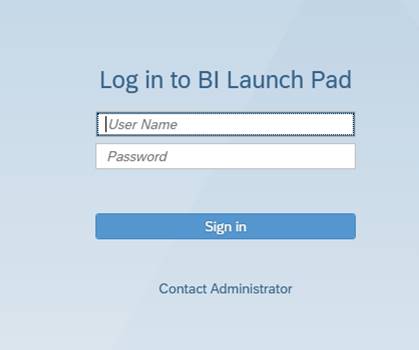
Please Note: The login screens will look a bit different. Generic SAP screens will be used temporarily and will be updated at a later date (please see screenshot below).
In addition, there appears to be an issue with transferring reports from Rich Client to the server and back. IBM and the Infrastructure team will work with the vendor as a fix for this specific continuing issue becomes available.
Screenshot of the generic login screen:
__________________________________________________________________________________________
November 20, 2024 UPDATE: Several issues have been identified after the installation of the Business Objects patch upgrade. Work is taking place now to resolve those issues and a communication will be shared once resolved.
_______________________________________________________________________
November 20, 2024 FINAL UPDATE: The installation of the Business Objects patch upgrade has completed. Business Objects is now accessible; however, users may experience degraded performance while the Business Objects server catches up on the scheduled jobs from this morning. The CWDS Infrastructure team and IBM are monitoring for potential issues.
NOTE: Web Intelligence Rich Client users may need to update their workstation installation of the client.
_______________________________________________________________________
November 20, 2024 UPDATE: This is a reminder that the Business Objects production environment is not available this morning, to install a patch update. A follow-up communication will be sent out once the environment has become available, estimated to occur at around 12:00 Noon.
________________________________________________________________________
UPDATE: We are applying a patch to address this Business Objects issue, which will be implemented in both the Training and Production Environments. These environments will be unavailable during the following patch periods:
Action Required
If users experience any issues please follow your county process for reporting issues or you may contact the IBM Boulder Help Desk at 1-800-428-8268.
_____________________________________________________________________________
An issue has been discovered with the current version of Business Objects used with the CWS/CMS application.
Issue Description:
Whenever a numeric field, such as government entity code, is used as a condition in a data provider (query), the query will run correctly the first time. Whenever the data provider is edited, the system will return a type mismatch error and require the user to remove and re-add the condition. The query will then run, as long as it is not edited again.
This only appears to be an issue with numeric fields; character fields, such as Client Name, do not experience this issue. Once the query is run, it operates normally as long as the user does not go back and edit the data provider. The user can refresh the data and save, as well as edit the report formatting, without issue.
Issue Resolution:
A patch level update will be required to resolve the issue. The CWDS Office and IBM are evaluating the next Business Objects patch to determine if it will resolve the issue, without generating any new issues. There is currently no estimated time of when the patch will be implemented. Additional updates will be sent out as new information is received.
Workaround:
When Business Objects informs the user of a type mismatch error after a numeric field is used as a condition in a data provider, and the data provider is edited, then the user must remove and re-enter the condition. The query will run, without issue, as long as the data provider is not edited again.
Action Required
Until the issue is corrected with the appropriate patch update, users will need to perform the workaround listed above, by removing and re-entering the condition when they receive a type mismatch error message.
December 11, 2024 UPDATE 2: The BO production environment was experiencing congestion and running slowly this morning. As a result, the BO team performed a reboot at 11:30 AM. The reboot was successful, and everything is now functioning properly.
_________________________________________________________________
December 11, 2024 UPDATE: The CWDS custom branding effort failed last night and the Business Objects (BO) login screen was reverted to the generic SAP version. The BO team will research this branding issue and then determine the next steps in regards to this effort.
Meanwhile, the BO production environment is down this morning. The BO team is researching the cause, including if it is related to last night’s rollback following the failed custom branding effort.
The BO reports did not run last night. Once the BO environment has recovered, users will need to review the reports, and run them if needed.
Additional communications will be delivered as new updates are provided.
_________________________________________________________________
December 6, 2024 UPDATE: The CWDS Office and IBM have scheduled an outage for the Business Objects (BO) server to update the branding on the Business Intelligence login screen. Following the update, the branding will return to the normal CWDS branding instead of the generic SAP screens. The scheduled BO maintenance outage will be on Tuesday, December 10, 2024, beginning at 4:00 PM and concluding at 4:30 PM.
BO will not be available during the scheduled outage.
The CWDS Office and IBM continue to work with the vendor on the issue regarding transferring reports to and from the Rich Client server. An additional update will be provided once the fix for that issue has been determined.
_________________________________________________________________________________
November 21, 2024 UPDATE: After working with the Business Objects vendor, IBM and the CWDS Infrastructure team are reporting that Business Objects is now up and operational, with a few limited issues / differences that remain to be resolved.
Please Note: The login screens will look a bit different. Generic SAP screens will be used temporarily and will be updated at a later date (please see screenshot below).
In addition, there appears to be an issue with transferring reports from Rich Client to the server and back. IBM and the Infrastructure team will work with the vendor as a fix for this specific continuing issue becomes available.
Screenshot of the generic login screen:
__________________________________________________________________________________________
November 20, 2024 UPDATE: Several issues have been identified after the installation of the Business Objects patch upgrade. Work is taking place now to resolve those issues and a communication will be shared once resolved.
_______________________________________________________________________
November 20, 2024 FINAL UPDATE: The installation of the Business Objects patch upgrade has completed. Business Objects is now accessible; however, users may experience degraded performance while the Business Objects server catches up on the scheduled jobs from this morning. The CWDS Infrastructure team and IBM are monitoring for potential issues.
NOTE: Web Intelligence Rich Client users may need to update their workstation installation of the client.
_______________________________________________________________________
November 20, 2024 UPDATE: This is a reminder that the Business Objects production environment is not available this morning, to install a patch update. A follow-up communication will be sent out once the environment has become available, estimated to occur at around 12:00 Noon.
________________________________________________________________________
UPDATE: We are applying a patch to address this Business Objects issue, which will be implemented in both the Training and Production Environments. These environments will be unavailable during the following patch periods:
- Training Environment - November 19th, 8:00 AM to 12:00 PM
- Production Environment - November 20th, 8:00 AM to 12:00 PM
Action Required
If users experience any issues please follow your county process for reporting issues or you may contact the IBM Boulder Help Desk at 1-800-428-8268.
_____________________________________________________________________________
An issue has been discovered with the current version of Business Objects used with the CWS/CMS application.
Issue Description:
Whenever a numeric field, such as government entity code, is used as a condition in a data provider (query), the query will run correctly the first time. Whenever the data provider is edited, the system will return a type mismatch error and require the user to remove and re-add the condition. The query will then run, as long as it is not edited again.
This only appears to be an issue with numeric fields; character fields, such as Client Name, do not experience this issue. Once the query is run, it operates normally as long as the user does not go back and edit the data provider. The user can refresh the data and save, as well as edit the report formatting, without issue.
Issue Resolution:
A patch level update will be required to resolve the issue. The CWDS Office and IBM are evaluating the next Business Objects patch to determine if it will resolve the issue, without generating any new issues. There is currently no estimated time of when the patch will be implemented. Additional updates will be sent out as new information is received.
Workaround:
When Business Objects informs the user of a type mismatch error after a numeric field is used as a condition in a data provider, and the data provider is edited, then the user must remove and re-enter the condition. The query will run, without issue, as long as the data provider is not edited again.
Action Required
Until the issue is corrected with the appropriate patch update, users will need to perform the workaround listed above, by removing and re-entering the condition when they receive a type mismatch error message.
CARES-Live Scheduled Maintenance - Dec. 19, 2024 | 6 PM - 8 PM
All SPOCs and Technical Contacts:
The CARES-Live team has scheduled maintenance for the CARES-Live application. The maintenance is scheduled for Thursday, December 19, 2024, from 6:00 PM to 8:00 PM. During this scheduled maintenance the CARES-Live team will focus on application maintenance changes that are not visible to CARES-Live users.
NOTE: Users will not be able to access the CARES-Live application during the scheduled outage.
Action Required
If users experience any issues with CARES-Live, please follow your county process for reporting issues. CARES-Live County Administrators may contact the CARES Service Desk through the CWDS ServiceNow Customer Support Management (CSM) Portal. Alternate methods are phoning 1-855-292-3444 or via email at Servicedesk@cwds.ca.gov during normal business hours. You may also email after hours and a Service Desk representative will contact you the next business day.
The CARES-Live team has scheduled maintenance for the CARES-Live application. The maintenance is scheduled for Thursday, December 19, 2024, from 6:00 PM to 8:00 PM. During this scheduled maintenance the CARES-Live team will focus on application maintenance changes that are not visible to CARES-Live users.
NOTE: Users will not be able to access the CARES-Live application during the scheduled outage.
Action Required
If users experience any issues with CARES-Live, please follow your county process for reporting issues. CARES-Live County Administrators may contact the CARES Service Desk through the CWDS ServiceNow Customer Support Management (CSM) Portal. Alternate methods are phoning 1-855-292-3444 or via email at Servicedesk@cwds.ca.gov during normal business hours. You may also email after hours and a Service Desk representative will contact you the next business day.
CWS/CMS: California Department of Education - Updated Providers List
All SPOCs and Technical Contacts
On Friday, December 6, 2024, the list of Education Providers in the CWS/CMS application was updated with data obtained from the California Department of Education (CDE). During this update, several Education Providers in the application were end dated. This occurs whenever an existing CWS/CMS Education Provider no longer shows up as an active Education Provider in the data obtained from CDE.
Attached is a list of all closed Public Education Providers and all closed Private Education Providers that were end dated during this update. This information is being provided to assist counties with determining if any data corrections are needed.
Please contact CDE with any questions regarding the list of closed schools.
Email: cdsadmin@cde.ca.gov
On Friday, December 6, 2024, the list of Education Providers in the CWS/CMS application was updated with data obtained from the California Department of Education (CDE). During this update, several Education Providers in the application were end dated. This occurs whenever an existing CWS/CMS Education Provider no longer shows up as an active Education Provider in the data obtained from CDE.
Attached is a list of all closed Public Education Providers and all closed Private Education Providers that were end dated during this update. This information is being provided to assist counties with determining if any data corrections are needed.
Please contact CDE with any questions regarding the list of closed schools.
Email: cdsadmin@cde.ca.gov
CWS/CMS: Business Objects Issue and Workaround – UPDATE - Dec. 10, 2024 | 4 PM - 4:30 PM
All SPOCs, Technical Contacts, and CAD Contacts:
December 6, 2024 UPDATE: The CWDS Office and IBM have scheduled an outage for the Business Objects (BO) server to update the branding on the Business Intelligence login screen. Following the update, the branding will return to the normal CWDS branding instead of the generic SAP screens. The scheduled BO maintenance outage will be on Tuesday, December 10, 2024, beginning at 4:00 PM and concluding at 4:30 PM.
BO will not be available during the scheduled outage.
The CWDS Office and IBM continue to work with the vendor on the issue regarding transferring reports to and from the Rich Client server. An additional update will be provided once the fix for that issue has been determined.
_________________________________________________________________________________
November 21, 2024 UPDATE: After working with the Business Objects vendor, IBM and the CWDS Infrastructure team are reporting that Business Objects is now up and operational, with a few limited issues / differences that remain to be resolved.
Please Note: The login screens will look a bit different. Generic SAP screens will be used temporarily and will be updated at a later date (please see screenshot below).
In addition, there appears to be an issue with transferring reports from Rich Client to the server and back. IBM and the Infrastructure team will work with the vendor as a fix for this specific continuing issue becomes available.
Screenshot of the generic login screen:

__________________________________________________________________________________________
November 20, 2024 UPDATE: Several issues have been identified after the installation of the Business Objects patch upgrade. Work is taking place now to resolve those issues and a communication will be shared once resolved.
_______________________________________________________________________
November 20, 2024 FINAL UPDATE: The installation of the Business Objects patch upgrade has completed. Business Objects is now accessible; however, users may experience degraded performance while the Business Objects server catches up on the scheduled jobs from this morning. The CWDS Infrastructure team and IBM are monitoring for potential issues.
NOTE: Web Intelligence Rich Client users may need to update their workstation installation of the client.
_______________________________________________________________________
November 20, 2024 UPDATE: This is a reminder that the Business Objects production environment is not available this morning, to install a patch update. A follow-up communication will be sent out once the environment has become available, estimated to occur at around 12:00 Noon.
________________________________________________________________________
UPDATE: We are applying a patch to address this Business Objects issue, which will be implemented in both the Training and Production Environments. These environments will be unavailable during the following patch periods:
If users experience any issues please follow your county process for reporting issues or you may contact the IBM Boulder Help Desk at 1-800-428-8268.
_____________________________________________________________________________
An issue has been discovered with the current version of Business Objects used with the CWS/CMS application.
Issue Description:
Whenever a numeric field, such as government entity code, is used as a condition in a data provider (query), the query will run correctly the first time. Whenever the data provider is edited, the system will return a type mismatch error and require the user to remove and re-add the condition. The query will then run, as long as it is not edited again.
This only appears to be an issue with numeric fields; character fields, such as Client Name, do not experience this issue. Once the query is run, it operates normally as long as the user does not go back and edit the data provider. The user can refresh the data and save, as well as edit the report formatting, without issue.
Issue Resolution:
A patch level update will be required to resolve the issue. The CWDS Office and IBM are evaluating the next Business Objects patch to determine if it will resolve the issue, without generating any new issues. There is currently no estimated time of when the patch will be implemented. Additional updates will be sent out as new information is received.
Workaround:
When Business Objects informs the user of a type mismatch error after a numeric field is used as a condition in a data provider, and the data provider is edited, then the user must remove and re-enter the condition. The query will run, without issue, as long as the data provider is not edited again.
Action Required
Until the issue is corrected with the appropriate patch update, users will need to perform the workaround listed above, by removing and re-entering the condition when they receive a type mismatch error message.
December 6, 2024 UPDATE: The CWDS Office and IBM have scheduled an outage for the Business Objects (BO) server to update the branding on the Business Intelligence login screen. Following the update, the branding will return to the normal CWDS branding instead of the generic SAP screens. The scheduled BO maintenance outage will be on Tuesday, December 10, 2024, beginning at 4:00 PM and concluding at 4:30 PM.
BO will not be available during the scheduled outage.
The CWDS Office and IBM continue to work with the vendor on the issue regarding transferring reports to and from the Rich Client server. An additional update will be provided once the fix for that issue has been determined.
_________________________________________________________________________________
November 21, 2024 UPDATE: After working with the Business Objects vendor, IBM and the CWDS Infrastructure team are reporting that Business Objects is now up and operational, with a few limited issues / differences that remain to be resolved.
Please Note: The login screens will look a bit different. Generic SAP screens will be used temporarily and will be updated at a later date (please see screenshot below).
In addition, there appears to be an issue with transferring reports from Rich Client to the server and back. IBM and the Infrastructure team will work with the vendor as a fix for this specific continuing issue becomes available.
Screenshot of the generic login screen:
__________________________________________________________________________________________
November 20, 2024 UPDATE: Several issues have been identified after the installation of the Business Objects patch upgrade. Work is taking place now to resolve those issues and a communication will be shared once resolved.
_______________________________________________________________________
November 20, 2024 FINAL UPDATE: The installation of the Business Objects patch upgrade has completed. Business Objects is now accessible; however, users may experience degraded performance while the Business Objects server catches up on the scheduled jobs from this morning. The CWDS Infrastructure team and IBM are monitoring for potential issues.
NOTE: Web Intelligence Rich Client users may need to update their workstation installation of the client.
_______________________________________________________________________
November 20, 2024 UPDATE: This is a reminder that the Business Objects production environment is not available this morning, to install a patch update. A follow-up communication will be sent out once the environment has become available, estimated to occur at around 12:00 Noon.
________________________________________________________________________
UPDATE: We are applying a patch to address this Business Objects issue, which will be implemented in both the Training and Production Environments. These environments will be unavailable during the following patch periods:
- Training Environment - November 19th, 8:00 AM to 12:00 PM
- Production Environment - November 20th, 8:00 AM to 12:00 PM
If users experience any issues please follow your county process for reporting issues or you may contact the IBM Boulder Help Desk at 1-800-428-8268.
_____________________________________________________________________________
An issue has been discovered with the current version of Business Objects used with the CWS/CMS application.
Issue Description:
Whenever a numeric field, such as government entity code, is used as a condition in a data provider (query), the query will run correctly the first time. Whenever the data provider is edited, the system will return a type mismatch error and require the user to remove and re-add the condition. The query will then run, as long as it is not edited again.
This only appears to be an issue with numeric fields; character fields, such as Client Name, do not experience this issue. Once the query is run, it operates normally as long as the user does not go back and edit the data provider. The user can refresh the data and save, as well as edit the report formatting, without issue.
Issue Resolution:
A patch level update will be required to resolve the issue. The CWDS Office and IBM are evaluating the next Business Objects patch to determine if it will resolve the issue, without generating any new issues. There is currently no estimated time of when the patch will be implemented. Additional updates will be sent out as new information is received.
Workaround:
When Business Objects informs the user of a type mismatch error after a numeric field is used as a condition in a data provider, and the data provider is edited, then the user must remove and re-enter the condition. The query will run, without issue, as long as the data provider is not edited again.
Action Required
Until the issue is corrected with the appropriate patch update, users will need to perform the workaround listed above, by removing and re-entering the condition when they receive a type mismatch error message.
CWS/CMS: CDT Service Desk Bulletin - SAFE Cloud Service Scheduled Maintenance
ALL SPOCs, Technical Contacts and CAD Contacts:
The California Department of Technology (CDT) has scheduled maintenance of the SAFE Cloud service. The maintenance begins on Saturday, December 14, 2024, at 8:00 PM and concludes on Sunday, December 15, 2024, at 2:00 AM. The activity will cause interruptions in the SAFE Cloud service. Some Business Objects (BO) reports will fail to send, or automated scripts may fail to retrieve from SAFE during this scheduled maintenance.
Action Required
All users should logoff of the SAFE Cloud service prior to the start of the stated maintenance timeframe. Please check on your scheduled BO SAFE reports and automated FTP scripts. If needed, re-run the reports and scripts.
Contact the IBM Help Desk (800-428-8268) to report any issues with your Business Objects content in SAFE.
The California Department of Technology (CDT) has scheduled maintenance of the SAFE Cloud service. The maintenance begins on Saturday, December 14, 2024, at 8:00 PM and concludes on Sunday, December 15, 2024, at 2:00 AM. The activity will cause interruptions in the SAFE Cloud service. Some Business Objects (BO) reports will fail to send, or automated scripts may fail to retrieve from SAFE during this scheduled maintenance.
Action Required
All users should logoff of the SAFE Cloud service prior to the start of the stated maintenance timeframe. Please check on your scheduled BO SAFE reports and automated FTP scripts. If needed, re-run the reports and scripts.
Contact the IBM Help Desk (800-428-8268) to report any issues with your Business Objects content in SAFE.
CWS-CARES Calendar - December 2024 to February 2025
To: Child Welfare Directors, Child Welfare Director-Alternates, Tribal Leadership, Probation Leadership, and Core Constituents CC: All CARES SPOCs and Implementation Coordinators
Child Welfare Leadership and Core Constituents,
As part of our ongoing effort to provide you greater insight into upcoming meetings for the CWS-CARES project, please see the updated CWS-CARES Meeting Calendar for December 2024, January 2025, and February 2025. This calendar includes all meetings hosted by the CWS-CARES project, including Core Constituent demonstrations, implementation meetings, and key workgroups.
This calendar includes the following Core Constituent sessions:
Action Required
Please share this information with those at your organization you feel should be informed. Note: This calendar is point-in-time and subject to change. The CWS-CARES project aims to deliver a sustainable, more real-time calendar solution that will be accessible to all meeting participants and leadership in the future.
If you have any questions, please contact CWS_CustRel@osi.ca.gov.
Child Welfare Leadership and Core Constituents,
As part of our ongoing effort to provide you greater insight into upcoming meetings for the CWS-CARES project, please see the updated CWS-CARES Meeting Calendar for December 2024, January 2025, and February 2025. This calendar includes all meetings hosted by the CWS-CARES project, including Core Constituent demonstrations, implementation meetings, and key workgroups.
This calendar includes the following Core Constituent sessions:
- Prototype Demonstrations: Core Constituents see some of the feedback they provided in the Prototype Demonstrations reflected in CWS-CARES and provide further feedback on the developed product.
- Build Review Demonstrations: Core Constituents see some of the feedback they provided in the Prototype Demonstrations reflected in CWS-CARES and provide further feedback on the developed product.
- Milestone User Feedback: Participants test specific functionalities for a subset of milestones in CWS-CARES, scheduled for January 6 - January 17, 2025. Core Constituents were requested to recruit participants for this feedback activity. Note: Extended User Scenario Testing (EUST) 2, where Participants test end-to-end real-world scenarios in CWS-CARES, begins in March 2025 and will be reflected on the March calendar.
Action Required
Please share this information with those at your organization you feel should be informed. Note: This calendar is point-in-time and subject to change. The CWS-CARES project aims to deliver a sustainable, more real-time calendar solution that will be accessible to all meeting participants and leadership in the future.
If you have any questions, please contact CWS_CustRel@osi.ca.gov.
CWS-CARES Scheduled Maintenance - Dec.11, 2024 | 5 PM - 7 PM
All Pilot County RFA Implementation Coordinators and SPOCs:
The CWS-CARES team has scheduled maintenance activity for the CWS-CARES production environment for Wednesday, December 11, 2024, beginning at 5:00 PM and concluding at 7:00 PM. During the maintenance window, the CWS-CARES Resource Family Approval (RFA) Application Submission, Review, and Approval Process will be accessible for pilot counties Contra Costa, Fresno, Placer, and Santa Clara.
During the maintenance window, document related functionality in the CARES application will not be accessible.
Action Required
No action required from end-users during this maintenance window.
If users experience any issues with the CWS-CARES, please follow your county process for reporting issues. CWS-CARES County Administrators may contact the CARES Service Desk through the CWDS ServiceNow Customer Support Management (CSM) Portal. Alternate methods are phoning 1-855-292-3444 or via email at Servicedesk@cwds.ca.gov during normal business hours. You may also email after hours, and a Service Desk representative will contact you the next business day.
The CWS-CARES team has scheduled maintenance activity for the CWS-CARES production environment for Wednesday, December 11, 2024, beginning at 5:00 PM and concluding at 7:00 PM. During the maintenance window, the CWS-CARES Resource Family Approval (RFA) Application Submission, Review, and Approval Process will be accessible for pilot counties Contra Costa, Fresno, Placer, and Santa Clara.
During the maintenance window, document related functionality in the CARES application will not be accessible.
Action Required
No action required from end-users during this maintenance window.
If users experience any issues with the CWS-CARES, please follow your county process for reporting issues. CWS-CARES County Administrators may contact the CARES Service Desk through the CWDS ServiceNow Customer Support Management (CSM) Portal. Alternate methods are phoning 1-855-292-3444 or via email at Servicedesk@cwds.ca.gov during normal business hours. You may also email after hours, and a Service Desk representative will contact you the next business day.
If unable to find a specific Bulletin, please contact Communications.